
Single Sign-On
ShadowMap discovers every Single Sign-On (SSO) and identity-provider integration embedded in your public web applications, attributes each one to a provider and account/tenant identifier, scores its redirect and protocol security, and gives you a triage workflow to approve known integrations or flag rogue ones. It answers a question most teams can't answer from the inside: which authentication endpoints actually exist on my external attack surface, and are any of them shadow IT, deprecated, or misconfigured?
Overview
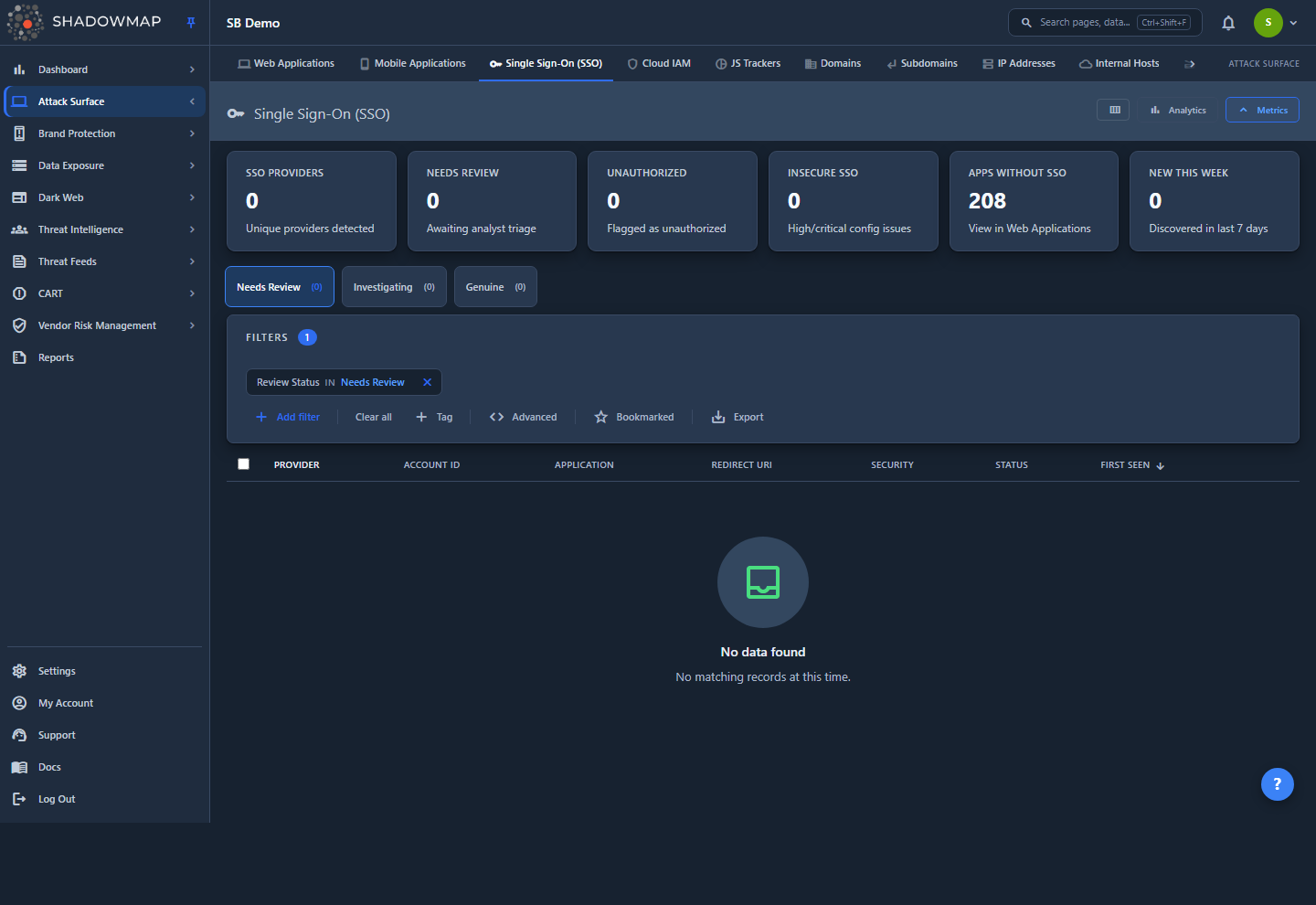
The page is a flat, paginated table — one row per detected SSO login configuration (a sso_login_pages record), not one row per provider. A single provider such as Azure AD or Okta can appear many times if it is wired into multiple applications, with multiple account/tenant IDs, or with multiple redirect URIs.
At the top of the page you get:
- A metrics strip (six KPI cards) summarising provider count, triage backlog, insecure configurations, and coverage.
- An analytics panel with a Provider Distribution bar chart and a 30-day Detection Trend line chart (toggle it from the header).
- Status tabs — Needs Review, Investigating, Genuine — with live counts.
- A filter bar, a Bookmarked quick toggle, and Export.
Each row carries the provider (with favicon), the account ID, the application it was found on, the redirect URI, a security verdict, a risk level, a review status, and first/last-seen timestamps. Clicking a row opens a detail drawer; the Open full page link in the drawer opens the full provider detail view with per-account, per-application, and per-redirect breakdowns.
How it works
The mechanics below are not visible in the UI but determine what you see and how counts are derived.
Where the data comes from
SSO records are a byproduct of ShadowMap's web-application crawl, not a separate scan. When the crawler renders a discovered web application, it identifies authentication endpoints and SSO buttons/redirects (OAuth 2.0, OpenID Connect, SAML, and similar protocols), then extracts the provider, the account/tenant/client identifier embedded in the integration, the redirect URI, and the favicon. Each detection is stored as one sso_login_pages row tied to the application (http_app_id) and the scan session it was seen in. Because detection rides on the web-app crawl, an SSO record only exists for applications ShadowMap has already discovered and crawled — see Web Applications.
What "live" means (and why counts can differ from the raw table)
Every list, KPI, and provider-detail query is scoped to your most recent completed scan. A record is counted only when:
- its
last_seen_onis at or after the latest scan's start date (it was re-observed in the current scan), and - the parent application's status is open, reopened, or newly-discovered — closed/retired applications are excluded.
This is why a provider that was decommissioned shows up only until the next scan no longer finds it, and why the page reflects your current surface rather than all-time history.
Risk Level
Each row gets a risk_level derived from its redirect URI — this is a fast structural heuristic, independent of the deeper security verdict below:
| Risk | Trigger | Why it matters |
|---|---|---|
| Critical | Redirect URI uses http:// (cleartext) | Authorization codes/tokens can be intercepted in transit |
| High | Redirect URI contains a wildcard (*) | Open-redirect / token-leak surface in the OAuth flow |
| Low | HTTPS redirect with no wildcard | No structural redirect weakness detected |
Security verdict (goblin analyzer)
Separately from the redirect heuristic, ShadowMap's SSO assessment (internally, the goblin analyzer) inspects each configuration and writes a security_status plus a list of structured findings. This is the column that surfaces real protocol-level weaknesses — implicit OAuth flow, missing PKCE/state, cleartext or wildcard redirects, weak SAML configuration, and similar checks. MFA presence is recorded when detectable.
| Security badge | Meaning |
|---|---|
| Insecure (red) | A high/critical misconfiguration was found |
| Weak (amber) | Only low/medium findings |
| Secure (grey) | Assessed, no material findings |
| Not Applicable (grey) | Assessment doesn't apply to this configuration |
| Not Assessed (muted) | Not yet evaluated |
The list badge shows the verdict plus a finding count (e.g. Insecure · 3); hover to see the finding titles. Per-finding severity is ranked critical > high > medium > low > none, and the provider detail page rolls findings up across all of that provider's records, deduplicated by check ID, and reports the single worst severity.
Review status and the triage tabs
The list groups records into three status tabs: Needs Review (default), Investigating, and Genuine. Each record carries a review_status of needs_review, approved, or unauthorized underneath — Genuine shows the approved records and Investigating shows the flagged (unauthorized) ones. The row's Status column still reads Needs Review, Approved, or Unauthorized, and the triage buttons read Approve, Flag Unauthorized, and Reset, so read "Genuine" as Approved and "Investigating" as flagged/Unauthorized.
When you Approve, Flag, or Reset — from a row's detail drawer or the bulk action bar — the change is written to the specific detection records you selected (by record ID), scoped to your company. It is not applied to every row that shares the provider name. If the same provider (say Okta) is wired into several applications and you only want to vet one of them, approve just that record; the others stay in Needs Review.
The status tab badges and the provider-count KPI cards count distinct providers per status, while the list rows, filters, and export operate on individual detection records — so a provider with records in more than one status can surface under more than one tab.
Why this matters
| Use case | What to look for |
|---|---|
| Shadow IT discovery | Any provider your IT/identity team doesn't recognise. A Google Workspace or Okta integration on a microsite nobody owns is unmanaged SaaS. |
| Deprecated endpoint risk | Old IdPs that should have been decommissioned (e.g. legacy ADFS after an Azure AD migration). A live login endpoint bypasses current MFA/conditional-access policy. |
| Configuration drift | Multiple account/tenant IDs for the same provider can indicate fragmented identity management across business units. |
| Coverage gaps | Applications with no SSO record may be using local authentication outside centralized identity controls — see the Apps Without SSO card. |
| Insecure flows | Insecure/Weak security badges and Critical/High risk rows are the redirect and protocol weaknesses to fix first. |
| M&A / audit | The provider inventory is a continuously-updated authentication-mechanism inventory useful for SOC 2 / ISO 27001 / NIST 800-53 evidence and for due diligence. |
Key Metrics
The metrics strip shows six clickable cards. Clicking a card switches to the corresponding tab or applies the corresponding filter — except Apps Without SSO, which opens Web Applications.
| Card | Counts | Click behavior |
|---|---|---|
| SSO Providers | Distinct providers in the current scan | Opens the Needs Review tab |
| Needs Review | Providers awaiting triage | Opens the Needs Review tab |
| Unauthorized | Providers flagged (unauthorized) | Opens the Investigating tab |
| Insecure SSO | Records with security_status = insecure | Filters the list to insecure records |
| Apps Without SSO | Live apps minus apps with an SSO record | Opens Web Applications filtered to sso_providers = "none" |
| New This Week | Records first seen in the last 7 days | Opens Needs Review scoped to first_seen_on within the last 7 days |
Coverage math
Apps Without SSO = (distinct live web applications) − (distinct live applications with at least one SSO record). It is a coverage signal, not a defect list — many apps legitimately use local auth — but it's the fastest way to find applications outside your centralized identity perimeter.
Understanding the Data
Columns are configurable from the column customizer in the page header. Provider is always shown and cannot be hidden.
| Column | Description |
|---|---|
| Provider | Identity provider (e.g. Google, Azure AD, Okta, Auth0, OneLogin), with favicon. Sortable. |
| Account ID | The client ID, tenant ID, or configuration identifier embedded in the integration. Shown monospace. Sortable. |
| Application | URL of the web application the integration was found on. |
| Redirect URI | The OAuth/SAML redirect target. HTTP redirects are flagged with a warning icon. |
| Security | The goblin verdict (Insecure / Weak / Secure / Not Applicable / Not Assessed) with finding count. Sortable by underlying security severity. |
| Risk Level | Critical / High / Low, derived from the redirect URI (see How it works). Sortable. |
| Status | Review status: Needs Review, Approved, or Unauthorized. |
| Assigned To | Analyst the record is assigned to (off by default). |
| First Seen | When this configuration was first detected. Sortable. |
| Last Seen | When it was last observed in a scan. Sortable. |
Filtering & Search
Switch the status tabs (Needs Review / Investigating / Genuine) for the primary triage cut — tab selection injects a review_status rule into the active filter set, so it composes with everything else you apply.
The filter bar supports these fields:
| Filter | Notes |
|---|---|
| Provider | The SSO provider name |
| Account ID | Client/tenant/config identifier |
| Review Status | Needs Review / Approved / Unauthorized |
| Application | The host/app the integration lives on |
| Redirect URI | Match on the redirect target |
| Security Severity | The goblin per-finding severity |
| Security Status | Insecure / Weak / Secure / Not Assessed / Not Applicable |
| Risk Level | Critical / High / Low |
| Assigned To | The analyst the record is assigned to |
| Bookmarked | Your bookmarked records |
| First Seen / Last Seen | Date-range filters |
The Bookmarked quick toggle (star) in the filter bar restricts the list to records you've bookmarked. Custom tags can be added as filter values where configured.
Detail View
Detail drawer
Click any row to open a side drawer for fast triage without losing your place. It shows the provider identity and review status, the account ID, the application (as a clickable link), the redirect URI (with an HTTP warning), risk level, the security verdict (and an MFA detected chip when applicable), and the full list of security findings with per-finding severity, title, and detail. From the drawer you can Approve, Flag Unauthorized, or Reset to review, and step through records with the prev/next arrows. Open full page jumps to the provider detail view.
Provider detail page
Opening the full page for a provider gives a summary strip — total Account IDs, total Applications, total Redirect URIs (with an HTTP count warning), and First Detected — plus four tabs:
- Account IDs — every account/tenant/config ID for this provider, with app count and first/last seen. Clicking a row opens Web Applications filtered to that provider and that specific account.
- Applications — the web applications using this provider, with URL, account ID, and last-scanned date. Clicking opens the application in Web Applications.
- Redirect URIs — each redirect target with a secure/insecure indicator, protocol (HTTPS/HTTP), and whether it contains a wildcard.
- Activity — a timeline of first detection, last scan, and any analyst status change.
Taking Action
| Action | Where | Effect |
|---|---|---|
| Approve | Row drawer, bulk bar | Marks the selected record(s) as a known, authorized integration (moves them to the Genuine tab) |
| Flag Unauthorized | Row drawer, bulk bar | Marks the selected record(s) as unsanctioned / under investigation (moves them to the Investigating tab) |
| Reset to Review | Drawer, bulk bar | Returns the selected record(s) to Needs Review |
| Assign | Bulk bar | Assign selected records to an analyst (or clear the assignee) |
| Bookmark | Row action, bulk bar, keyboard s | Save for later; filter with the Bookmarked toggle |
| Comment | Row action | Threaded comments, with comment templates |
| Share | Row action, bulk bar, provider page | Open the integration share modal (row/bulk) or copy a link to the provider page |
| Export | Filter bar | Exports the current filtered, sorted view |
Select rows with the checkboxes (or the header select-all) to reveal the bulk action bar: bulk Approve, Flag, Reset, Assign, Bookmark, and Share across every selected record at once.
Triage workflow
Work the Needs Review tab top-down. Approve integrations your identity team recognises, Flag Unauthorized anything they don't, and use Insecure SSO / Critical risk filters to fast-track the configurations that are exploitable today. Select several rows with the checkboxes and act on them in one bulk operation to clear the backlog quickly.
Keyboard shortcuts
j / k move to the next/previous record (opening the drawer), Enter opens the focused record, Space toggles selection, s bookmarks, and Esc closes the drawer.
Common questions
Is this the list of my logins, or logins on my applications? It's the SSO integrations configured on your web applications — the identity providers your apps delegate authentication to. It is not a list of your employees' accounts.
Why does one provider appear on many rows? Each row is a distinct detection (a sso_login_pages record): the same provider can be wired into many applications, use several account/tenant IDs, or declare multiple redirect URIs. The provider detail page consolidates them.
Why is the count different from what I see in the table? KPI cards and tab badges generally count distinct providers, while the list rows and filters count individual detection rows. Everything is also scoped to your most recent scan and to live (non-closed) applications.
What's the difference between Risk Level and Security? Risk Level is a quick structural read of the redirect URI alone (HTTP = critical, wildcard = high). Security is the deeper analyzer verdict covering protocol-level weaknesses (implicit flow, missing PKCE/state, weak SAML, etc.) with individual findings.
Why is a provider "Not Assessed"? The security analyzer hasn't evaluated that configuration yet (or the schema/assessment hasn't run for it). The record is still inventoried; it just lacks a security verdict for now.
Does Approve/Flag change anything in my identity provider? No. It's an internal triage label in ShadowMap. Use it to track which detected integrations you've vetted and which need investigation or takedown — remediation happens in your IdP.
How do I find apps that aren't using SSO at all? Click the Apps Without SSO card; it opens Web Applications filtered to applications with no detected SSO provider.
Related
- Web Applications — the source of SSO detections; drill-downs from this page land here, pre-filtered by provider/account.
- Technology Stack — the broader set of technologies and integrations fingerprinted on your applications.
- JS Trackers — another class of third-party integrations embedded in your web properties.
- SSL Certificates — certificate posture for the same applications hosting these login endpoints.
- Members — manage analyst accounts and roles for assigning and triaging SSO records.