
Links and Redirects
Every redirect your public web applications emit is a place an attacker can send your users. Links and Redirects inventories those Location hops across your scanned web surface, classifies each as internal or external, scores it for impersonation and off-site risk, and gives you a status workflow to triage and accept them.
Overview
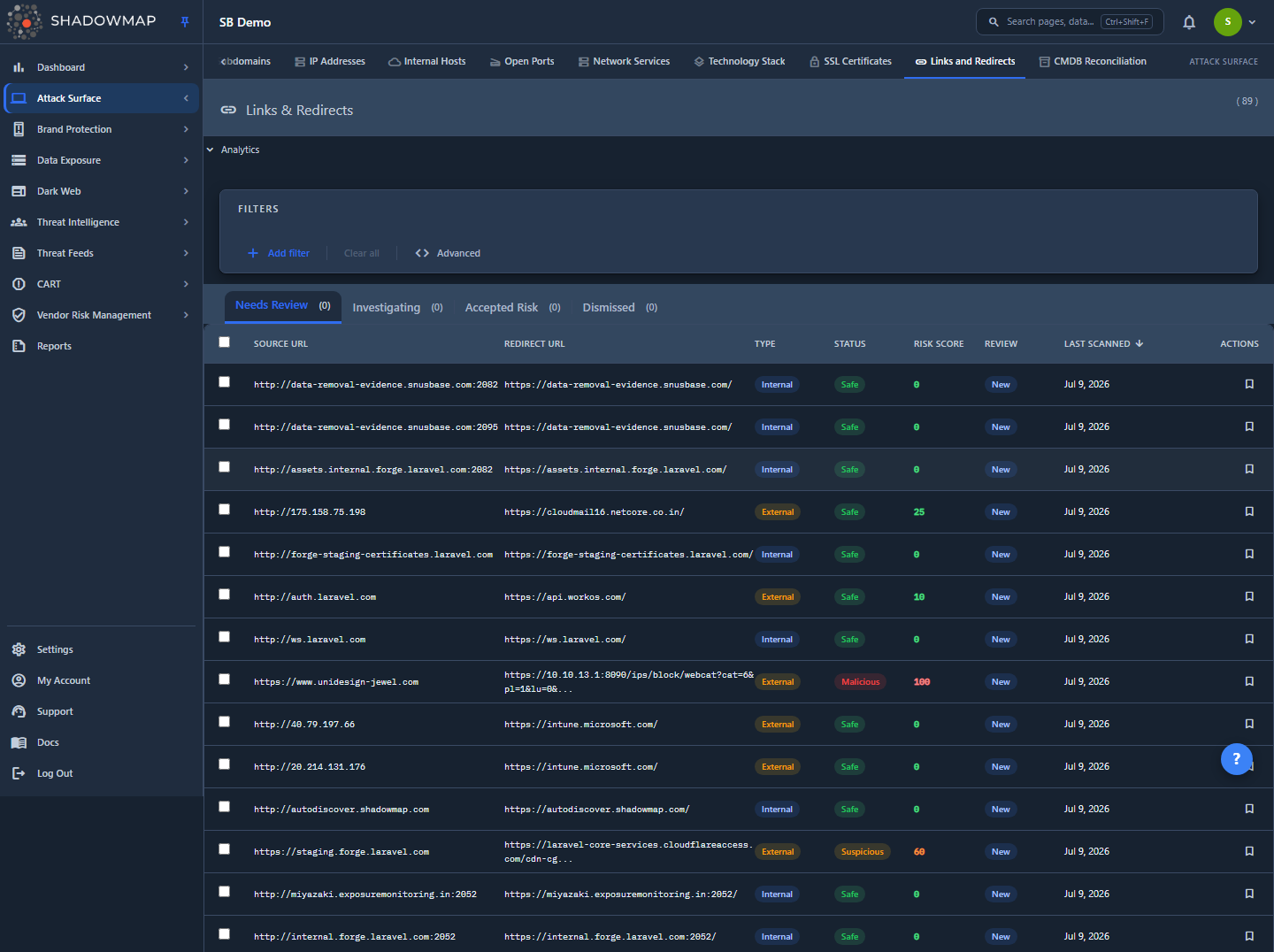
A redirect is an HTTP response from one of your web applications that sends the browser somewhere else — a 301/302 to another path, another host, a shortener, or an external domain. ShadowMap captures these during the same web-application scan that powers Web Applications, then surfaces them here as a reviewable list.
The page is a table-first triage workspace:
- A metrics strip at the top (collapsible under the Analytics toggle) summarises total redirects, malicious/suspicious/safe counts, and external count.
- An analytics panel (in the same collapsible section) charts a 30-day detection trend, an internal-vs-external donut, and a status-distribution bar.
- Status tabs (Needs Review / Investigating / Accepted Risk / Dismissed) split the list by your triage decision. The list opens on Needs Review — there is no combined All tab.
- The table lists one row per redirect endpoint, with source URL, redirect target, type, threat status, risk score, review state, and last-scanned date.
- A detail drawer opens on row click with the full risk breakdown and triage actions.
Each redirect carries three independent classifications that are easy to conflate — keep them straight:
| Dimension | Values | What it answers |
|---|---|---|
| Type | Internal, External | Does the redirect stay on your own domain (same eTLD+1 / relative path) or send the user off-site? |
| Status | Safe, Suspicious, Malicious | Threat level of the destination, computed by the redirect scorer. |
| Review | Needs Review, Investigating, Accepted Risk, Dismissed | Your analyst triage decision — separate from the automated threat status. |
How it works
Most of the mechanics here are not visible in the UI. This section is the part you cannot infer by clicking around.
Where redirects come from
Links and Redirects is not a separate crawl. It is built from the raw HTTP responses (http_apps) collected by your scheduled web-application scan, during the build:inventory step.
Each scanned HTTP response is sorted into exactly one of three buckets:
- Promoted to an application — it serves real content and becomes a row in Web Applications.
- Captured as a redirect — it carries a non-empty
Locationtarget and the app-inventory promotion gate rejects it as a redirect rather than a real app. These land here. - Dropped as noise — everything else.
So a redirect in this module is, by definition, a response your scanner saw that pointed the browser elsewhere instead of serving a page. The source_url column is the application URL that emitted the redirect; the redirect column is where it was sending traffic.
Stable identity across scans
A redirect endpoint is keyed by a hash of proto + host + port + path (IP-less, the same formula used for the application inventory's cdn_hash). This matters because the underlying scan-response ID is regenerated on every session — the hash is what lets ShadowMap recognise "the same redirect endpoint" week over week even as the raw scan rows churn.
A consequence: if the same source URL starts pointing at a new target, the existing row is updated in place — the redirect target, type, and threat status are re-scored, but the row's identity and your review/triage decision on it are preserved. You do not lose your triage state when the destination changes.
Lifecycle: open, reopened, closed
Each redirect has a lifecycle state, set by the sync step, that is distinct from both its threat status and your review status:
| Lifecycle state | Meaning | On the list? |
|---|---|---|
| Open | Observed in the latest scan. | Yes |
| Reopened | Previously closed, then seen again. | Yes |
| Closed | No longer observed. Kept for history; review row preserved. | No |
Miss-smoothing prevents flapping
A redirect is only closed after it has been missed in 2 consecutive scans (CLOSE_AFTER_MISSES = 2). Scanner coverage per session is stochastic, so a single missed scan will not flap a live redirect off your list. The summary metrics, status tabs, and analytics all count only live (open/reopened) redirects — closed ones drop out of every view but their records survive.
How the threat status is scored
The Status (Safe / Suspicious / Malicious) and the Risk Score (0–100) come from a deterministic URL scorer that compares the source URL against the redirect target — the Status is computed and stored at scan time, while the Risk Score is recomputed per row at query time from the same rules. There is no external reputation lookup in this scorer — it is heuristic and runs entirely on the URL structure.
Absolute rules are evaluated first and short-circuit everything else:
| Condition | Result |
|---|---|
| Empty redirect target | Safe, score 0 |
| Internal redirect (relative path, or same eTLD+1 as the source) | Safe, score 0 |
Destination host is a known-trusted brand domain (e.g. google.com, microsoft.com, apple.com, cloudflare.com) | Safe, score 0 |
Target matches a known phishing/impersonation pattern (e.g. obfuscated paypal…com, punycode xn--, login-verify, free-gift) | Malicious, score 100 |
If none of those fire, the scorer adds up weighted risk signals on the destination:
| Signal | Weight | Why it's risky |
|---|---|---|
| Redirect to a raw IP address | +80 | Legitimate sites rarely redirect to bare IPs |
Punycode / IDN (xn--) | +70 | Homograph / lookalike-domain attacks |
Suspicious path token (login, verify, secure, wallet, bank, payment, checkout, …) | +50 | Credential-harvest / payment-lure indicators |
URL shortener (bit.ly, t.co, tinyurl.com, goo.gl, …) | +45 | Hides the true destination |
Risky TLD (.ru, .cn, .tk, .ml, .xyz, .zip, .top, …) | +30 | Disproportionately abused TLDs |
Protocol-relative URL (//host) | +30 | Inherits the page's scheme; common in injection |
| HTTP destination (no TLS) | +20 | Downgrades the user to an unencrypted hop |
| Deep subdomain nesting (4+ labels) | +15 | a.b.c.d.example.com-style obfuscation |
| Unknown (non-whitelisted) destination | +10 | Small baseline weight for unrecognised hosts |
A trusted-brand destination subtracts 50 from the total. The score is clamped to 0–100, then mapped to a status by threshold:
- Score ≥ 70 → Malicious
- Score 30–69 → Suspicious
- Score < 30 → Safe
The detail drawer's Risk Factors list shows exactly which signals fired for a given redirect (e.g. shortener, risky_tld, http_no_tls), so you can see why a row was scored the way it was.
Internal redirects are always Safe
Any redirect that stays on the same registrable domain as its source (same eTLD+1) or uses a relative path is classified Internal and forced to Safe with score 0 — it never runs the weighted rules. The risk model is specifically about sending users off your domain. Review external redirects first.
Review status vs. threat status
The automated Status is the scanner's opinion. The Review status is yours, stored in a separate review record per redirect and surfaced as the four status tabs. A redirect with no review record sits in Needs Review; the triage actions write your decision and record the reviewer and timestamp, and your review state survives re-scans, target changes, and even a close → reopen cycle.
The triage-action verbs and the tab a row lands in are worded differently — keep this mapping straight:
| Status tab | Set by | Meaning |
|---|---|---|
| Needs Review | (untriaged, or Reset) | Not yet triaged — the default landing tab. |
| Investigating | Flag | Flagged for attention or escalation. |
| Accepted Risk | Accept | Acknowledged and accepted as legitimate/known. |
| Dismissed | Mark Reviewed | Looked at; understood/expected — no further action. |
The four tabs are mutually exclusive and together cover every live redirect, so Needs Review is the live total minus everything you've flagged, accepted, or dismissed. There is no separate All tab — the whole live population is the sum of the four tab counts.
Understanding the data
Each table row is one redirect endpoint.
| Column | Description | Sortable |
|---|---|---|
| Source URL | The application URL that emitted the redirect (standard ports omitted, path normalised). | Yes |
| Redirect URL | The Location target the browser is sent to. | Yes |
| Type | Internal (blue) or External (orange). | Yes |
| Status | Threat level — Safe (green), Suspicious (orange), Malicious (red). | Yes |
| Risk Score | 0–100 numeric score behind the status, computed per row at query time. Coloured by band: ≥70 critical, 30–69 high, <30 low. | No |
| Review | Your triage state — the tab the row belongs to (Needs Review / Investigating / Accepted Risk / Dismissed). | No |
| Last Scanned | When the redirect was last observed. Default sort (newest first). | Yes |
Sort and the metrics tell different stories
The metrics strip and analytics count live redirects only and reflect the whole company. The table reflects the active status tab plus any filters. A high External or Malicious count in the strip is your cue to filter the table down and triage.
Filtering and search
The search-filter bar supports four fields, each combinable into AND-conditions:
| Filter | Type | Notes |
|---|---|---|
| Source URL | Free text (contains) | Find redirects originating from a specific app or path. |
| Redirect URL | Free text (contains) | Find everything pointing at a given destination host. |
| Redirect Type | Internal / External | Pick from the dropdown. |
| Redirect Status | Safe / Suspicious / Malicious | Pick from the dropdown. |
Additional quick-filter entry points:
- Metrics strip cards — clicking Malicious, Suspicious, or Safe filters the table to that status.
- Analytics charts — clicking a slice of the type donut or a bar in the status chart applies the matching filter (type or status).
- Status tabs — switching tabs scopes the list to that review state and clears the active filters.
Switching status tabs resets the field filters; metric and chart clicks set a single filter rule.
Detail view
Clicking any row opens the Redirect Detail drawer, which expands on the table row:
- URLs — full source and redirect target (untruncated, monospace).
- Classification — Type, Status, and the Risk Score shown as
score / 100. - Risk Factors — the named signals that contributed to the score (only shown when the scorer flagged at least one).
- Review — current review status and the timestamp it was last reviewed.
- Timestamps — last scanned, and when the redirect was first discovered.
- Actions (write permission only) — Mark Reviewed, Flag, Accept, and Bookmark/Unbookmark.
Taking action
Triage is the point of this module. Actions are available inline on each row, from the detail drawer, and in bulk.
Triage a single redirect
Hover a row (or open its drawer) and use the inline buttons, or use keyboard shortcuts on the focused row:
| Action | Effect |
|---|---|
| Mark Reviewed | You've looked at it and it's understood/expected — moves the row to Dismissed. |
| Flag | Needs attention or escalation — moves the row to Investigating. |
| Accept | Acknowledged and accepted as legitimate/known — moves the row to Accepted Risk. |
| Bookmark | Pins it for later — independent of review status. |
Bulk triage
Select rows via the checkboxes (or select all on the page) to reveal the bulk action bar:
- Tick the redirects you want to act on.
- In the bar, choose Reviewed (→ Dismissed), Flag (→ Investigating), Accept (→ Accepted Risk), or Reset (back to Needs Review).
- Or click Export to download the current filtered view as XLSX.
Status-change and bookmark actions require the write permission on this module; read-only users see the data but not the triage buttons. Every triage and bookmark action is written to the central audit trail (visible under Settings → Audit Logs).
Keyboard shortcuts
The list is fully keyboard-drivable. Press ? to toggle the shortcut overlay.
| Key | Action |
|---|---|
j / ↓ | Next row |
k / ↑ | Previous row |
Enter | Open detail drawer |
Esc | Close drawer / deselect |
Space | Toggle selection |
r | Mark reviewed |
f | Flag |
a | Accept |
b | Toggle bookmark |
? | Toggle this help |
Export
The Export button (in the bulk bar) queues an asynchronous XLSX job using the current filters. A progress toast tracks the job; when it finishes, download the file from the toast. Exports run server-side, so large result sets don't block the page. Use this for compliance evidence or to share a redirect inventory with a GRC team.
Common questions
Is this a separate scan or crawl? No. Redirects are extracted from the same scheduled web-application scan that builds your application inventory. There's no separate schedule to configure — new redirects appear after the next web scan completes.
Why is an external redirect marked Safe? Because its destination host is on the trusted-brand whitelist (e.g. a redirect to microsoft.com or cloudflare.com), which forces Safe and zeroes the score. Trusted brand destinations are not treated as impersonation.
A redirect to a brand we use is flagged Malicious. Why? The malicious-pattern rule catches obfuscated brand impersonation (e.g. microsoft-com.ru or a punycode lookalike). A genuine *.microsoft.com apex is whitelisted and short-circuits to Safe before that rule runs; a lookalike is not, and falls through to Malicious. If you've confirmed the destination is legitimate, Accept it to record that decision.
The risk scoring uses URL heuristics only — is there reputation data? The scorer in this module is deterministic and structural (IP destinations, shorteners, risky TLDs, punycode, suspicious path tokens, missing TLS). It does not call an external reputation service. Treat the score as a prioritisation signal, then verify the destination before acting.
A redirect disappeared from the list — was it deleted? No. If its endpoint wasn't observed in 2 consecutive scans it's marked Closed and hidden from the live list, but its record and your review decision are retained. If the same endpoint is seen again, it reopens.
Does changing my review status change the threat Status? No. Review status (Needs Review / Investigating / Accepted Risk / Dismissed) is your triage decision and is stored separately from the scanner-computed threat Status (Safe/Suspicious/Malicious). Accepting a Malicious redirect records your acknowledgement without re-scoring it.
Why do the metric counts not match the visible rows? The metrics strip and analytics count every live redirect for the whole company; the table always shows one triage tab plus any filters you've applied. There is no combined All tab, so the strip total equals the sum of the four tab badges (Needs Review + Investigating + Accepted Risk + Dismissed) — clear your filters and add them up to reconcile.
Related
- Web Applications — the same scan that inventories your apps produces these redirects; the source URL of every redirect is one of your web applications.
- Phishing URLs — where an external redirect target is an impersonation domain attacking your brand, that is phishing, not your own attack surface.
- SSL Certificates — redirects that downgrade to plain HTTP (the
http_no_tlssignal) often correlate with TLS gaps tracked here. - Alerts — high-risk findings across modules surface here for unified triage.
- Severity Levels — how ShadowMap normalises status and risk scoring across modules.