
Takedowns
Takedowns is the operational queue for getting malicious content removed at the source. When ShadowMap (or you) finds a phishing site, a squatted domain, a fake mobile app, an impersonating social profile, leaked files, or other actionable threats, you raise a takedown request from that finding. This page is where every request lives: it tracks each one from the moment it is raised, through automated dispatch to the hosting provider / registrar / platform, to the moment the content goes dark.
Overview
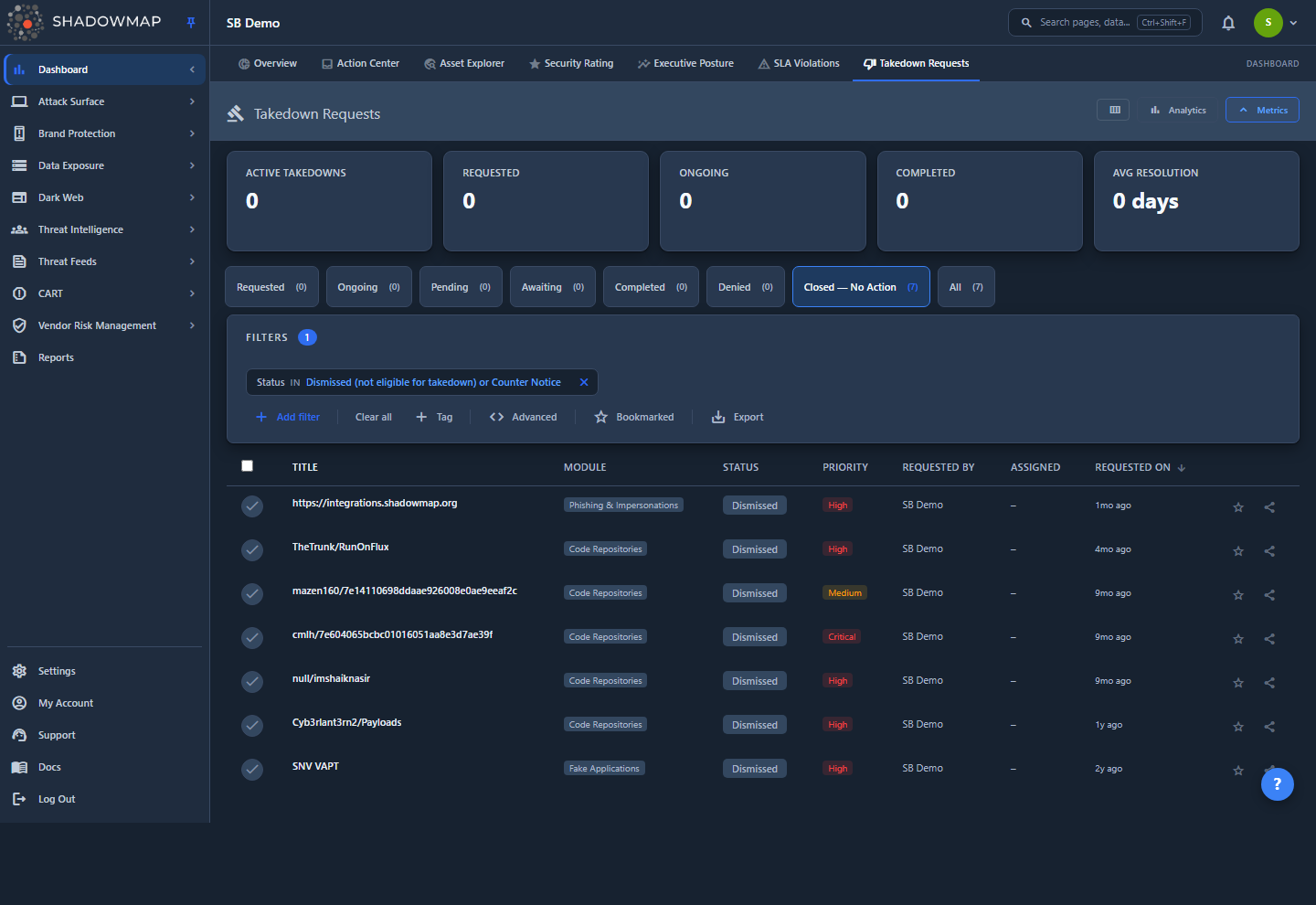
The page opens on /dashboard/takedown-list/requested — the Requested tab — showing takedowns that have been raised but not yet sent to a provider. Across the top you get a five-card metrics strip and an optional analytics panel; below that are the status tabs, search/filter controls, and the request table.
Each row is one takedown request and shows its Title (the specific domain, URL, app, or asset), the Module it came from, current Status, Priority, who Requested it, who it is Assigned to, and when it was Requested On. Clicking a row opens a detail drawer with the full lifecycle, including a status timeline and — once dispatch begins — a live view of which providers have been contacted.
Where requests come from
You do not create takedowns on this page. A request is raised from the source finding itself (a Phishing URL, a Domain Squatting, a Mobile App, etc.) using the Request Takedown action in that module. This page is the central place to monitor and manage every request after it is raised.
How it works
The mechanics below are not visible in the UI but determine exactly what happens to a request after you raise it.
Eligibility: what can and cannot be taken down
Not every finding can be enforced. Two gates are checked before a request is even created:
- Module eligibility. Most modules support takedowns: Phishing & Impersonations, Domain Squatting, Mobile Applications, Fake Applications, Social Media Monitoring, Code Repositories, Docker Containers, Leaked Files, S3 Buckets, and Executive Leaks. Data Breaches and Stealer Logs are not eligible — that data is already published, shared peer-to-peer, and replicated across paste sites, so there is no single provider with the authority to remove it. Attempting to raise one of these is rejected.
- Account eligibility. Takedowns are only available to active CUSTOMER-tier accounts. Partner, vendor, POC, and disabled accounts cannot raise or dispatch takedowns.
Even among eligible modules, some have no automated dispatch path and are tracked for visibility only, handled manually by the abuse team: Ransomware Groups, Telegram, Executive Leaks (and the ineligible Data Breaches / Stealer Logs). For these, the request exists to record intent and status, but ShadowMap does not auto-email a provider.
Raising a request (the attestation)
When you submit a request you must complete a short form: Priority, Reason (Brand Impersonation, Executive Impersonation, Copyright Infringement, Fraud, or Trademark Infringement), a contact (a team member or a custom registrar/abuse-desk contact), optional notes, and a mandatory authorization attestation.
The attestation is legally load-bearing. By checking it you confirm, under penalty of perjury, that you are authorized to act for your organization, that you authorize ShadowMap to submit takedown notices on its behalf, and that you have a good-faith belief the identified use is unauthorized. A request cannot be submitted without it — the attestation is what gives ShadowMap the authority to swear, on the outbound provider notice, that it acts on your behalf. Who attested, when, and which wording version is recorded as an audit trail that defends the notice against a counter-notice or wrongful-takedown claim.
One request per finding
A finding can only have one open takedown request. If a request already exists for that record, a new one is rejected as a duplicate. To raise the priority or add information, work the existing request rather than creating another.
The dispatch engine and cadence
Once a request is raised in Requested status, an automated dispatcher takes over. It runs on a recurring cron and, for each eligible request, resolves the right provider(s) — the hosting provider, registrar, app store, code-host abuse channel, social platform, etc. — and sends a notice using the matched template, attaching your organization's authorization letter when one is on file.
Dispatch is cadence-driven, not a single email. Each request follows a four-step escalation schedule whose timing depends on its priority:
| Priority | Initial | Reminder | Escalate | MS Teams alert |
|---|---|---|---|---|
| Critical | T+0 | T+2 days | T+5 days | T+10 days |
| High | T+0 | T+4 days | T+7 days | T+14 days |
| Medium | T+0 | T+5 days | T+10 days | T+18 days |
| Low | T+0 | T+7 days | T+14 days | T+21 days |
T is the time the request was raised. The Initial notice goes out right away; if the content is still live, a Reminder follows, then an Escalate step that widens recipients (parent provider plus a legal contact), and finally a stale-case alert to the internal team. Each provider on a request advances on its own independent cursor — a registrar can be on its reminder while the hosting provider is already escalating. Enterprise accounts may have a tighter contractual SLA that overrides these defaults.
The cron runs frequently but only sends a step when its scheduled time arrives, so you will not see duplicate notices. The first successful Initial send flips the request from Requested to Ongoing.
How a takedown gets marked complete
ShadowMap does not rely on the provider to tell us the content is gone. A separate heartbeat probe checks the target on an hourly cadence (HTTP, DNS, app-store listing, code-host API, etc., depending on the module). A request is auto-closed to Completed only when the evidence is unambiguous:
- at least 3 probes over a window spanning 4 or more hours, and
- every probe in that window shows the target is dead, and
- at least two distinct failure signatures appear (e.g. an HTTP 404 and a DNS NXDOMAIN) — three identical "connection reset" results are treated as a possible network issue on our side, not a real removal. Exception: when every probe returns the same definitive "resource is gone" signal — a DNS NXDOMAIN, an HTTP 404 / 410 / 451, or an app-store / code-host / registry "not found" — that consistency is itself confirmation, so a single repeated signature is enough. The two-distinct rule only guards ambiguous signals like a connection reset or refusal; and
- no parking-page placeholder was detected (a parked domain may just have a new unrelated owner, not a genuine takedown).
In practice a genuinely-dead target auto-closes roughly four hours after the first dead probe; a target that flickers between up and down never satisfies "all dead in window" and stays open. Resolution time — the days between Requested On and Completed On — feeds the Avg Resolution metric.
Understanding the data
Statuses
Status is shown as a colored badge in the list, the detail drawer, and the status-distribution chart. Requests move through these states:
| Status | Meaning |
|---|---|
| Requested | Raised, not yet dispatched to any provider. |
| Ongoing | The initial notice has been sent; the cadence is actively working the case. |
| Pending with hosting | Awaiting action from the hosting provider after a notice. |
| Awaiting response | Notice sent; waiting on a reply from the provider or platform. |
| Counter notice received | The other party has filed a counter-notice contesting the takedown (terminal). Surfaced under the Closed — No Action tab. |
| Completed | The content is confirmed removed (terminal). |
| Takedown denied | The provider declined the request (terminal). |
| Dismissed | The request is not eligible for enforcement (e.g. wrong account type) and will never be dispatched; kept searchable only (terminal). Surfaced under the Closed — No Action tab. |
Tabs across the page mirror the lifecycle states — Requested, Ongoing, Pending, Awaiting, Completed, Denied, and Closed — No Action — plus All. The Closed — No Action tab collects the two terminal outcomes that ended without a removal — Dismissed and Counter notice received — so no request falls outside a tab; the seven status tabs partition every request and their counts sum to All. Each tab shows a live count.
Priority
Priority is chosen when you raise the request and drives the dispatch cadence above. High is the suggested level because most takedowns are time-sensitive, but you can pick any of the four.
| Priority | Badge | Cadence |
|---|---|---|
| Critical | Red | Fastest escalation (reminder at day 2). |
| High | Red | Reminder at day 4. |
| Medium | Amber | Reminder at day 5. |
| Low | Blue | Slowest escalation (reminder at day 7). |
Columns
You can show or hide any column except Title using the column customizer in the page header.
| Column | Description |
|---|---|
| Title | The specific asset targeted (domain, URL, app name, etc.). Always visible. Derived from the source record, not free text. |
| Module | The ShadowMap module the finding came from (Phishing & Impersonations, Domain Squatting, Mobile Applications, and so on). |
| Status | Current lifecycle state (see table above). |
| Priority | Critical / High / Medium / Low. |
| Requested By | The contact recorded on the request. |
| Assigned To | The team or person responsible for the request, if assigned. |
| Requested On | When the request was raised, shown as relative time. |
Filtering & search
The search-and-filter bar supports building filter rules across all the fields above — Title, Module, Status, Priority, Requested By, Assigned To, Requested On (a date filter), and Bookmarked. Rules can be combined with AND/OR logic.
Two quick toggles sit beside the filters:
- Bookmarked — star a request from its row, then use this toggle to show only your bookmarked requests.
- Export — export the current, filtered, sorted view to a file. The export honors your active filters, sort, and search so it matches exactly what is on screen.
The metric cards and status tabs are themselves filters: clicking Active Takedowns jumps to All, and clicking Requested, Ongoing, or Completed drills into that status. Sort by Title, Status, Priority, or Requested On by clicking the column header.
Detail view
Click any row to open the detail drawer. Use the chevrons (or j / k) to move between requests without closing it. The drawer shows:
- Status, Priority, and Module badges at the top.
- Actions — Share the request, and View Source to jump straight to the originating finding in its module.
- Takedown Details — Title, Module, Status, Priority, Requested By, Requested On, Processed On, Completed On, and Assigned To.
- Status Timeline — every status change in order, with the date and who made the change.
- Takedown Dispatch Progress (once dispatch has started) — a summary strip of how many providers were Dispatched, how many are in the Manual queue, how many are In progress, and the total number of dispatch events. A Next action line shows the next scheduled cadence step and when it is due (flagged "due now" if overdue). Below that, a per-provider timeline shows each provider contacted, how many attempts were made, the latest cadence step, and the timestamp.
- Reason — the reason you selected when raising the request.
The dispatch timeline can also surface provider-level outcomes such as sent, failed, manual required (the platform has no email channel and a person must submit the notice via a web form), provider unresolved (no provider matched yet), template missing, and module ineligible. These help you and the abuse team see exactly where a case is stuck.
Taking action
From the list you can act on one request or many at once.
Per-row actions (hover a row):
- Bookmark — star a request for quick recall.
- Comment — add an internal comment or use a comment template.
- Share — share the request with a colleague.
Bulk actions (select rows with the checkboxes):
- Assign — assign the selected requests to a team or person, with a searchable picker. You can also Clear Assignee.
- Bookmark — bookmark all selected requests.
- Share — share the selected set.
Triage workflow
Use the Requested and Ongoing tabs as your live work queue, assign cases to owners with the bulk Assign action, and bookmark the ones you are personally tracking. Sort Ongoing by Priority to surface the cases most likely to be escalating soon.
Key metrics
The metrics strip gives a CISO-level read on takedown operations at a glance:
| Metric | What it counts |
|---|---|
| Active Takedowns | All requests not yet in a terminal state — everything except Completed, Denied, Dismissed, and Counter notice received. |
| Requested | Raised but not yet dispatched. |
| Ongoing | Actively being worked through the cadence. |
| Completed | Confirmed removed. |
| Avg Resolution | Average days from request to completion (Requested On → Completed On) across completed cases. |
The analytics panel (toggle it from the header) adds four charts: Status Distribution, Takedowns by Module (where your removals are concentrated), a 30-Day Trend of new requests vs. completed, and a Resolution Time distribution.
Common questions
How do I request a takedown? Open the finding in its source module — for example a Phishing URL, a Domain Squatting, a Mobile App, or a Leaked File — and use the Request Takedown action there. Fill in priority, reason, and a contact, accept the authorization attestation, and submit. The request then appears on this page in the Requested tab. You can submit several at once from a module's bulk selection.
Why can't I take down a data breach or stealer log? Those data sources are surfaced as intelligence, not enforceable findings. The data is already public, shared peer-to-peer, or replicated across many sites, so no single provider can remove it on request. ShadowMap shows it so you can respond (rotate credentials, notify affected users) but does not offer a takedown for it.
Why is the attestation mandatory? The outbound notice to a hosting provider or registrar asserts, under penalty of perjury, that ShadowMap is authorized to act on your behalf. The attestation is the record of that authorization. Without it the notice would be unsupported, so the request cannot be created until you accept it.
My request has been Ongoing for days — is anything happening? Yes. Dispatch is deliberately paced. After the initial notice, the engine waits for the priority-based interval before sending a reminder, then an escalation that widens recipients, then alerts the internal team if the content is still up. Open the request's drawer and check Takedown Dispatch Progress and the Next action line to see exactly what is scheduled next.
Who decides when a takedown is Completed? ShadowMap does, based on evidence, not the provider's word. An hourly heartbeat probe checks the target, and the request is only auto-closed when multiple probes over at least four hours all show it dead — with at least two different failure signatures, or one definitive "resource is gone" signal (such as a DNS NXDOMAIN or HTTP 404) repeated on every probe — and no parking-page placeholder. This avoids closing a case prematurely on a transient network glitch.
A request shows "manual required" or "provider unresolved" — what does that mean? "Manual required" means the platform has no automated email channel, so the notice must be filed by hand (typically via the platform's web form); the abuse team handles this. "Provider unresolved" means no provider has been matched to the target yet — often because the underlying finding was removed or the directory needs a new provider entry. Both are visible in the dispatch timeline so the case can be unblocked.
Can I see where a request came from? Open the drawer and use View Source to jump directly back to the originating finding in its module.
Related
- Phishing & Impersonations — the most common source of takedown requests.
- Domain Squatting — squatted and look-alike domains are raised as takedowns here.
- Mobile Applications — fake and impersonating apps that can be reported to the app stores.
- Alerts — the broader alert queue; takedowns are the enforcement arm for the threats it surfaces.
- Overview — the dashboard summarizes takedown pipeline health alongside other risk signals.