
Stealer Logs
Stealer Logs surfaces credentials and browser artifacts that infostealer malware (RedLine, Raccoon, Vidar, Lumma, and similar families) exfiltrated from infected machines belonging to your employees, contractors, and customers. Unlike a traditional breach dump, these credentials are recent, plaintext, and frequently still valid — and the same log often carries session cookies that let an attacker bypass MFA outright. This is one of the highest-urgency finding types in ShadowMap.
Overview
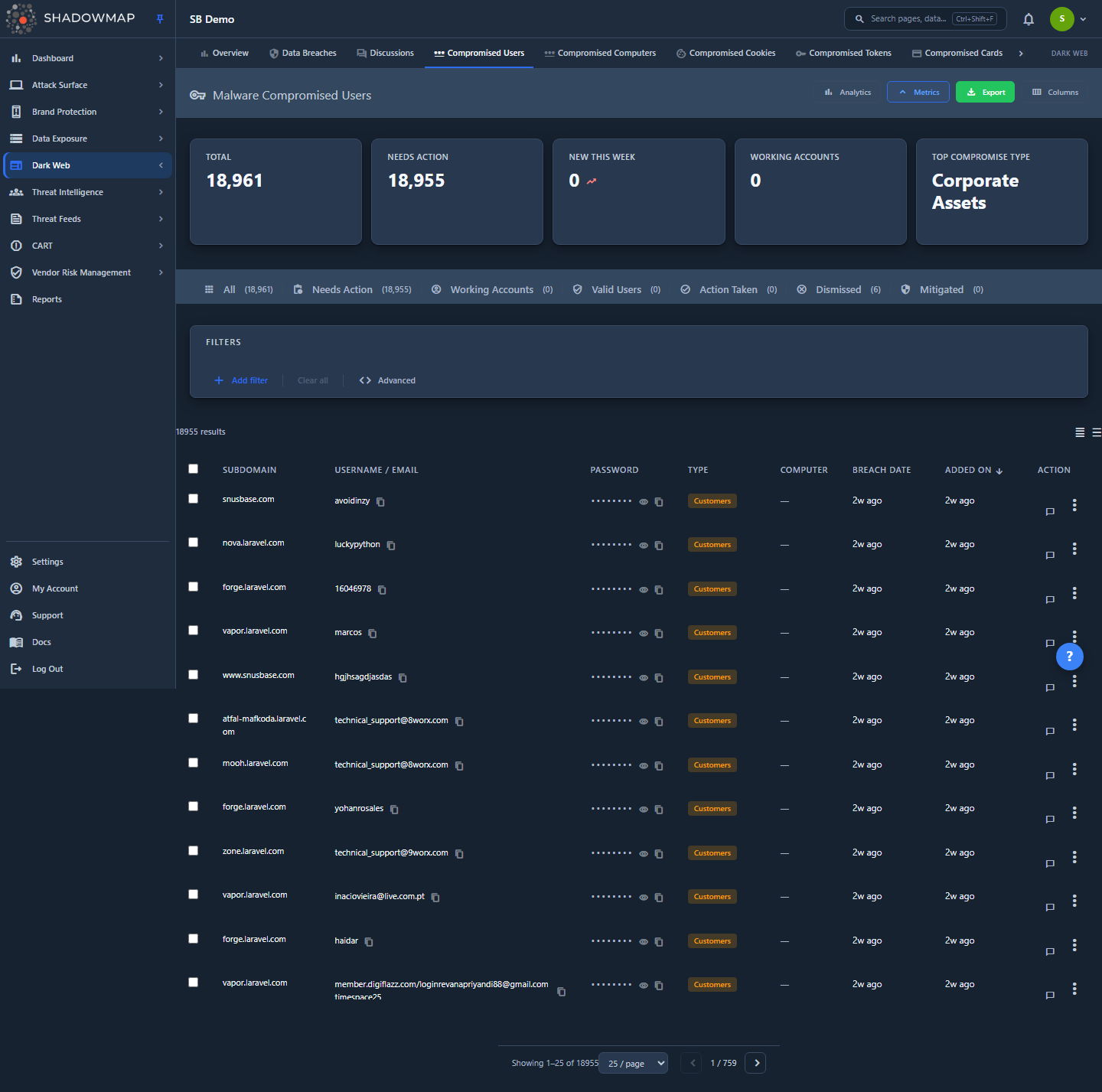
The module opens on Compromised Users — the credential view — filtered to the Needs Action status tab. Each row is a single stolen credential pair (username/email + password) tied back to the subdomain it was saved for, the infected machine that leaked it, and the date it was seen on a dark web source.
The module is split into two primary surfaces plus six secondary artifact types, all sharing the same triage workflow:
| Surface | What it lists | Route |
|---|---|---|
| Compromised Users | Individual stolen credentials (the default view) | /darkweb/stealer-logs-v2/passwords/<status> |
| Compromised Computers | The infected devices themselves, with full machine fingerprints | /darkweb/stealer-logs-v2/computers/<status> |
| Cookies / Autofills / Cards / Wallets / Tokens / History | Other artifacts pulled from the same logs | /darkweb/stealer-logs-v2/<type>/<status> |
| Automated Mitigation | Subdomain rules that auto-resolve credentials (see below) | /darkweb/stealer-logs-v2/automated-mitigation |
Above the table are a metrics strip (KPI cards), an optional analytics panel (trend and distribution charts, collapsed by default), the status tabs, and the filter bar. The page header also carries an Export action that downloads the current filtered result set. The toolbar shows the result count, a Columns customizer, and a compact/expanded density toggle.
Why credentials and devices are separated
A single infected laptop typically leaks dozens of credentials. Compromised Users is the credential-by-credential queue your IAM/SOC team works to force resets; Compromised Computers is the device-by-device view your endpoint team works to isolate and reimage. The two are linked — every credential row carries the machine's hardware ID (HWID), and the detail drawer shows sibling credentials from the same device.
How it works
These are mechanics you cannot infer from the table itself.
Where the data comes from
Infostealer malware harvests saved passwords from every browser profile on a machine, plus cookies, autofill data, payment cards, crypto wallets, app tokens, and browsing history. It also fingerprints the host (hostname, OS, hardware ID, IP, installed antivirus). The bundle is uploaded to a command-and-control server and then sold or traded on dark web marketplaces, criminal forums, and Telegram channels. ShadowMap ingests those repositories continuously and matches harvested credentials and visited domains against your monitored assets. A finding appears here when a stolen artifact references one of your domains/subdomains.
Why a stealer log is more urgent than a breach dump
| Factor | Traditional breach dump | Stealer log |
|---|---|---|
| Password age | Often months or years old | Days to weeks old — likely still valid |
| Password format | Frequently hashed | Plaintext — no cracking required |
| Session cookies | Not included | Included — can bypass MFA entirely |
| Scope per record | One breached service | Every service the user had saved credentials for |
| Device state | No device information | Full machine fingerprint — the host is actively compromised |
Compromise Type (audience classification)
Every credential is classified by who the leaked identity belongs to, which drives triage priority. The badge colour reflects relative risk:
| Compromise Type | Meaning | Badge |
|---|---|---|
| Corporate Assets | Credential for a corporate-owned system/service | Critical (red) |
| Corporate Users | An employee identity | High (amber) |
| Customers | An end-customer or partner identity | Warning (amber) |
| SaaS | A third-party SaaS login | Info (blue) |
| Others | Unclassified | Muted |
Compromise Type is both a column and a filter, and the top type drives the Top Compromise Type metric card.
Quality flag
The ingestor validates each harvested record. A Partial badge means some fields (e.g. the email or URL) failed format validation but the credential pair was still kept — for example a numeric login ID that isn't email-shaped. Rows that pass validation, are unknown, or only fail the email-format check render no badge. You can filter on the full Quality dimension (valid / partial / invalid / unknown) to compose with other rules.
Executive association
If a credential or device maps to an executive you monitor in Executive Monitoring, the row is flagged with a purple Executive badge and a left accent border, and carries an executive_id. Use the Executive filter to isolate these for priority handling.
Automated Mitigation
The Mitigated status is the only one that can be applied automatically. On the Automated Mitigation page you maintain a list of subdomains — services you have already remediated or that are out of scope (for example a decommissioned portal, or a service behind enforced SSO + hardware keys). Any compromised password whose subdomain matches a rule is auto-marked Mitigated instead of landing in Needs Action, keeping the live queue focused on credentials that still require a human. Add subdomains one at a time or upload an Excel/CSV file (the header row is skipped on import). The link to this page appears in the toolbar while you are on the Mitigated tab.
Status counts and tab math
The metrics strip and the per-tab counts are driven by a single summary endpoint, not by the current page of results. Changing a status tab clears any active filters and resets pagination so the tab count and the visible list never drift apart.
Understanding the data
Compromised Users columns
| Column | Description |
|---|---|
| Subdomain | The host the credential was saved for (e.g. vpn.yourcompany.com). Carries the Executive and Partial badges and any custom tags. |
| Username / Email | The stolen login identity. Click to copy. |
| Password | The stolen password, masked by default. Click to reveal/copy. |
| Type | Compromise Type classification badge (see above). |
| Computer | The infected machine's name. Clickable through to the device in Compromised Computers when a hardware ID is present. |
| Group | Malware/distribution group the log was attributed to (hidden by default). |
| Breach Date | When the credential was seen on the source (seen_on). More recent = higher urgency. |
| Added On | When ShadowMap ingested the record. Default sort, newest first. |
Use the Columns button to show/hide fields; your selection is remembered per browser via local storage. The compact/expanded toggle controls row density.
Status tabs
Credentials move through a six-state workflow, plus an All tab that shows every status at once:
| Tab | Meaning |
|---|---|
| All | Every credential regardless of status — the unscoped aggregate view. The Total metric card links here. |
| Needs Action | New, untriaged credentials. The default landing view. |
| Working Accounts | Confirmed to belong to an active, in-use account — highest priority for reset. |
| Valid Users | Confirmed to map to a real user identity (account may or may not still be active). |
| Action Taken | Remediation performed (password reset, sessions revoked). |
| Dismissed | Triaged and set aside — not a genuine exposure (the customer-facing label for the internal "False Positive" state). |
| Mitigated | Resolved via an Automated Mitigation subdomain rule (see How it works). |
Compromised Computers
The device view lists each infected machine with a fuller fingerprint. Default columns include Computer / Domain, Visited Domains (subdomain chips), IP, User, OS, Country, Group, and Breach Date; Passwords / Cookies / Tokens counts are available but hidden by default. Computers use a shorter three-state workflow — Needs Action, Action Taken, Dismissed — because the device-level status enum has no working/valid/mitigated states.
The computer detail view adds a Hardware and Posture section when the data is present: antivirus active at the time of compromise, whether the stealer ran with elevated (admin) privilege, OS build, CPU/GPU/RAM, display, process count, timezone, language, keyboard layouts, approximate location, and the stealer's working directory. It also lists the subdomains the machine had saved credentials for. Legacy rows captured before this enrichment was added hide the section.
Other artifact types
The same logs yield six additional artifact types, each with its own list, filters, and the same six-state status workflow:
| Type | Key fields |
|---|---|
| Cookies | Cookie domain, name, value, application, secure flag |
| Autofills | URL domain, field name, field value, application |
| Cards | Cardholder, BIN + last 4, card type, BIN, expiry |
| Wallets | Wallet type, address, wallet file, size |
| Tokens | App, token type, token value, file path |
| History | Domain, visit count, application |
Cookies are operationally important: a stolen, unexpired session cookie can let an attacker resume an authenticated session without the password and without re-triggering MFA, so treat cookie findings for sensitive applications with the same urgency as the credential itself.
Filtering & search
The filter bar builds compound (AND) conditions over typed fields. On Compromised Users the filterable fields are Domain, Subdomain, Username / Email, Compromise Type, Group, Custom Tags, Executive, Quality, Breach Date, and Added On. Date fields support range filtering. Filter value dropdowns are populated from your own data.
Metric cards double as quick filters: clicking Needs Action (or a status-named card) switches to that tab, and field-value cards apply the corresponding filter. Sorting is column-driven; page, per-page, sort column, sort order, and any applied filter rules are reflected in the URL query string, and the active status tab is part of the URL path — so the page/sort/filter/tab slice can be bookmarked or shared by copying the link.
Reproducing a view
Page, per-page, sort column, sort order, and any applied filter rules all live in the URL query string, and the active status tab is in the URL path — copy the address bar to hand a teammate the exact same filtered, sorted view on the same tab.
Detail view
Clicking a row opens a side drawer without leaving the list; Open Full Detail expands to a standalone page. For a credential the drawer shows:
- Credential — subdomain, full URL, username/email, password (masked, click to reveal), Compromise Type, group, breach date, added-on, and tags.
- Related Computer — the infected machine's name, IP, OS, country, and malware path.
- Other Credentials from Same Computer — sibling credentials leaked by the same device, so you can scope the full blast radius of one infection at a glance.
Use the drawer's prev/next arrows (or j/k) to walk the queue without reopening rows.
Taking action
Per-row
Each row's overflow (⋮) menu offers status transitions (the current tab's status is omitted to avoid no-ops), Add Comment, Open Detail, and — when the underlying machine file is available — Download File to pull the raw log artifact. Inline comments support reusable comment templates.
Bulk
Select rows with the checkboxes (or the header select-all) to reveal the bulk action bar, which can:
- Move the selection to any status — Needs Action, Action Taken, Dismissed, Working Accounts, Valid Users.
- Share the selection through a configured integration (e.g. ServiceNow), tracked under the Compromised Users SLA type. Available on the Compromised Users and Compromised Computers lists.
- Add Tags — apply comma-separated custom tags to the selection. Available on the six artifact-type lists (Cookies, Autofills, Cards, Wallets, Tokens, History).
Export is not a bulk action — use the page-header Export to download the current filtered list (see Overview).
Keyboard triage
Press ? for the shortcut overlay. Core keys: j/↓ next row, k/↑ previous row, Enter open detail, Space toggle selection, s bookmark, Esc close drawer.
Stealer log response is time-sensitive
Because these credentials are recent and plaintext, treat Needs Action items as live incidents. A typical containment sequence: revoke all active sessions for the user (SSO, VPN, email OAuth), force a password reset on every service in the credential's URL list, invalidate session cookies (a reset alone does not stop an attacker holding a valid cookie), and isolate the infected device for reimaging. Use the related-computer panel to find every credential that one infection exposed.
Common questions
Why is a stealer log worse than seeing my data in a breach? Breach dumps are usually old and often hashed. Stealer logs are recent and plaintext, they include session cookies that bypass MFA, and each one exposes every saved credential on the machine — not just one service. The machine itself is also actively compromised.
A credential's subdomain is for a service we no longer use. Do I have to triage each one? No. Add that subdomain under Automated Mitigation. Matching credentials are auto-marked Mitigated and stay out of the Needs Action queue. You can bulk-load subdomains from an Excel/CSV file.
What does the "Partial" badge mean? The ingestor kept the credential pair but one or more secondary fields (typically the email or URL) failed format validation — for example a numeric login ID that isn't email-shaped. It does not mean the credential is invalid. Filter on the Quality field to slice by validation state.
Why can I download a file from some rows but not others? The Download File action only appears when the raw machine artifact for that record is available (the row carries a hardware ID and timestamp for credentials, or a positive file-available flag for computers). Older or partial records may not have a downloadable file.
What is "Dismissed" versus "Mitigated"?Dismissed is the human "this isn't a real exposure / nothing to do" dismissal (the customer-facing label for the internal "False Positive" state). Mitigated specifically means the credential was auto-resolved by an Automated Mitigation subdomain rule. They are distinct tabs so you can see auto-resolved volume separately from analyst dismissals.
Should I worry about cookies if the password was already reset? Yes. A stolen, unexpired cookie can resume an authenticated session without the password and without re-prompting for MFA. Invalidate sessions at the identity provider, not just the password.
Related
- Compromised Computers — the device-centric view of the same infections, with full hardware and posture detail.
- Credit Card Leaks — payment cards harvested from these and other dark web sources.
- Leaked Credentials — credentials exposed via data leaks rather than infostealer malware; complementary coverage.
- Executive Monitoring — drives the Executive badge on credentials and devices tied to monitored leaders.
- Dark Web Overview — the dark web module landing page and how stealer logs fit alongside breaches, discussions, and Telegram.
- Sharing & Integrations — push selected findings to ServiceNow and other ticketing systems via the bulk Share action.