
Brand Protection Overview
The Brand Protection module is your centralized command center for monitoring threats that target your organization's brand identity. It aggregates findings from five sub-modules -- phishing sites, domain squatting, fake applications, executive monitoring, and social media impersonation -- into a single dashboard that gives security teams immediate visibility into brand abuse activity.
Overview
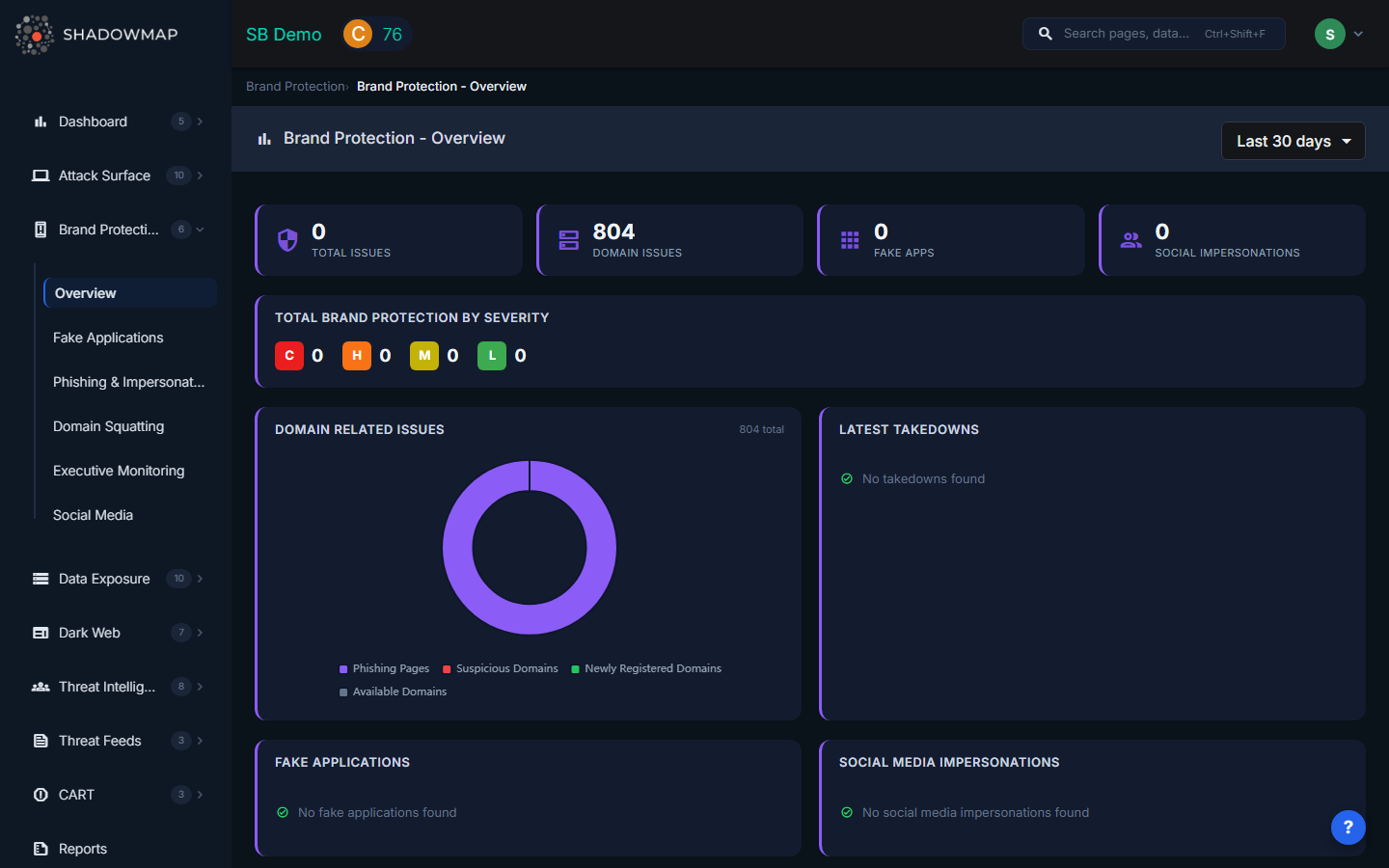
Hero Metrics
At the top of the dashboard, four hero metric cards provide an at-a-glance summary:
| Metric | What It Shows |
|---|---|
| Total Issues | Combined count of all brand protection findings across every sub-module (sum of Critical + High + Medium + Low severity) |
| Domain Issues | Number of domain-related issues including phishing URLs and domain squatting findings |
| Fake Apps | Count of counterfeit mobile applications detected on Google Play Store and Apple App Store |
| Social Impersonations | Number of social media accounts impersonating your brand or executives |
These metrics update dynamically based on the selected time filter. Use the dropdown in the header to switch between Today, Last 7 days, Last 30 days, or This Year.
Severity Breakdown
Below the hero strip, the Total Brand Protection By Severity card displays counts broken down by risk level:
- C (Critical) -- Active brand abuse with confirmed credential harvesting or malware distribution
- H (High) -- Live impersonation sites or apps with significant reach
- M (Medium) -- Registered lookalike domains or low-traffic impersonation pages
- L (Low) -- Inactive or parked domains, minor brand mentions
Dashboard Panels
Domain Related Issues
A donut chart visualizing the composition of domain-related issues (phishing URLs, typosquatted domains, etc.) with a total count in the center. If no domain issues exist, a green checkmark confirmation is displayed.
Latest Takedowns
A table showing recent takedown requests with three columns:
| Column | Description |
|---|---|
| Takedown Info | Title or URL of the entity being taken down |
| Module | Which sub-module originated the request (Phishing, Domain Squatting, Social Media, etc.) |
| Status | Current takedown status (Requested, In Progress, Completed) |
Fake Applications
A summary table listing detected counterfeit applications with their name and the store where they were found (Play Store or App Store).
Social Media Impersonations
A table displaying impersonation accounts with columns for Account name, Platform (shown as the platform icon), Followers count, and Risk level (shown as a color-coded badge).
Activity Feed
The right sidebar displays a chronological feed of recent activity across all brand protection sub-modules. Use the filter dropdown to narrow the feed to a specific module (Fake Applications, Domain Squatting, Phishing & Impersonations, or Social Media).
Typical Workflow
- Review hero metrics to identify which category has the most active threats
- Check the severity breakdown to prioritize Critical and High issues
- Examine the donut chart to understand the composition of domain-related threats
- Review latest takedowns to track progress on remediation
- Navigate to sub-modules for detailed investigation and action (takedown requests, status changes, tagging)
When to Use This Page
- During daily security stand-ups to get a quick brand threat summary
- When preparing executive reports on brand protection posture
- To identify which sub-module requires the most attention this week
- After a brand abuse campaign to track remediation progress across all channels
Modules
| Module | Description |
|---|---|
| Phishing & Impersonations | Websites impersonating your organization to steal credentials |
| Domain Squatting | Domains registered using variations of your brand name |
| Fake Applications | Mobile apps impersonating your brand on app stores |
| Executive Monitoring | Monitoring executives for breaches, dark web mentions, and impersonation |
| Social Media | Unauthorized use of your brand on social platforms |