
Executive Monitoring
ShadowMap monitors your organization's key executives for exposure across the dark web, data breaches, malware compromises, news mentions, underground chat forums, and social media impersonation. This module provides a consolidated threat view per executive, enabling your security team to protect leadership from targeted attacks, business email compromise (BEC), and social engineering campaigns.
Overview
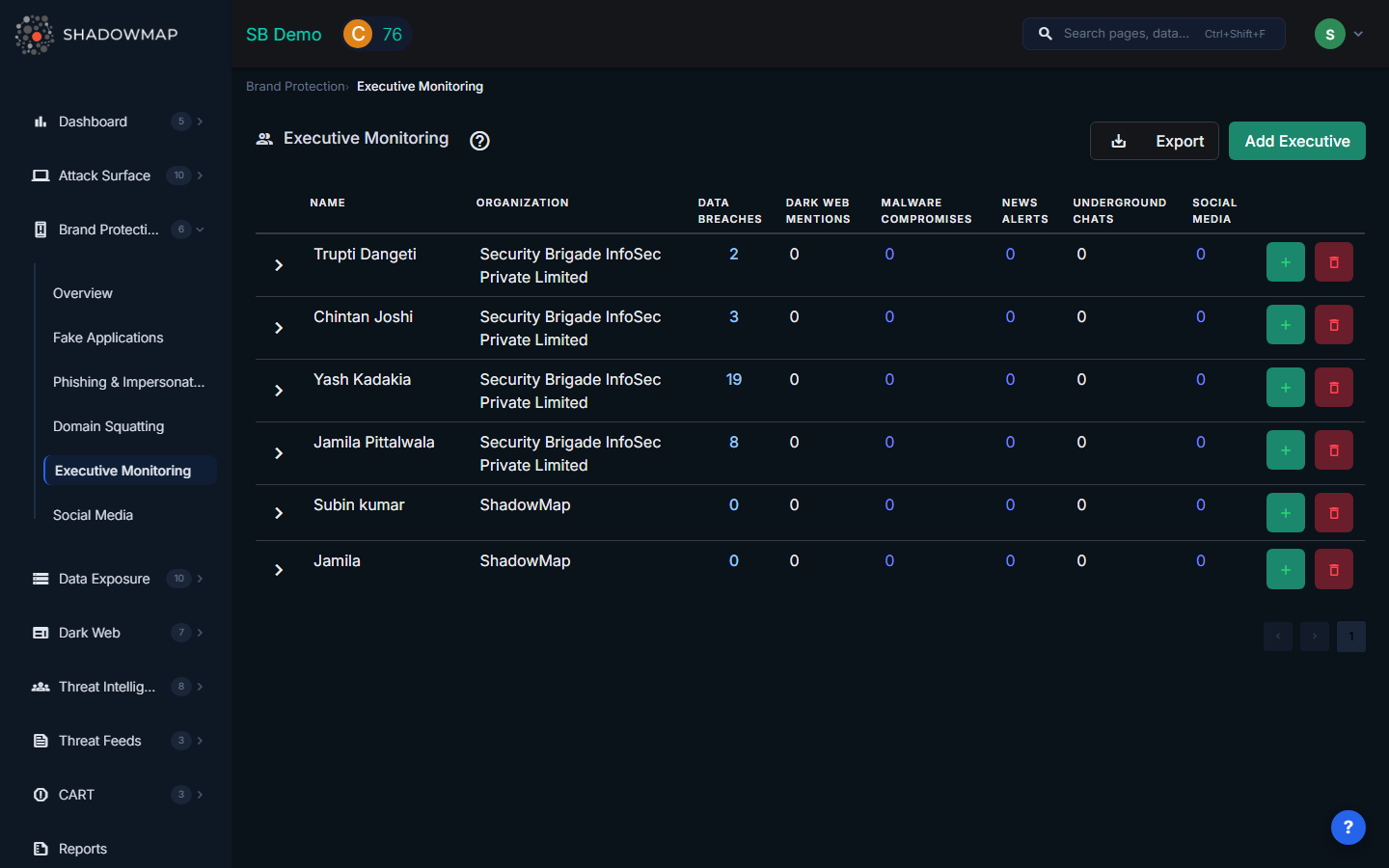
Executive Table
The main view displays a table with one row per monitored executive. Each row shows the executive's name, their organization, and threat counts across six categories:
| Column | Description |
|---|---|
| Name | The executive's full name |
| Organization | The organization the executive is associated with |
| Data Breaches | Number of data breach records containing the executive's information (links to Dark Web > Data Breaches filtered by executive) |
| Dark Web Mentions | Count of mentions found on dark web forums, marketplaces, and paste sites |
| Malware Compromises | Number of stealer log entries containing the executive's credentials (links to Dark Web > Stealer Logs filtered by executive) |
| News Alerts | Count of news articles mentioning the executive (links to Threat Intelligence > News Feed filtered by executive) |
| Underground Chats | Mentions found in underground Telegram channels and chat groups |
| Social Media | Number of social media accounts associated with or impersonating the executive (links to Brand Protection > Social Media filtered by executive) |
Each count is clickable and navigates to the relevant module pre-filtered for that specific executive.
Personal Information (Expandable Detail)
Clicking the expand arrow on any executive row reveals their tracked personal information, organized into categories:
| Category | Description |
|---|---|
| Emails | Email addresses associated with the executive |
| Usernames | Known usernames across platforms |
| Contact Numbers | Phone numbers |
| Computer Names | Device names found in stealer logs or breach data |
| IP Addresses | IP addresses associated with the executive's activity |
| Twitter/X handles | |
| Facebook profile identifiers | |
| LinkedIn profile identifiers | |
| Instagram handles |
Each personal information entry can be individually edited or deleted by clicking the respective icons.
Managing Executives
Adding an Executive
Click the Add Executive button in the header to open the add form:
- Enter the executive's full name
- Select their organization from the dropdown (populated from your company's configured organizations)
- Click Add Executive -- the executive will be added to the monitoring system
Adding Executive Details
After adding an executive, click the + button on their row to add personal information:
- Select the information type from the dropdown (Email, Username, Contact Number, Computer Name, IP Address, Twitter, Facebook, LinkedIn, Instagram)
- Enter the value
- Click Add -- the information will be incorporated into monitoring within 24 hours
Removing an Executive
Click the delete button on an executive's row. You will be prompted to confirm, as this action permanently removes the executive and all their associated monitoring data. This action cannot be undone.
Export
Click the Export button in the header to download the full executive monitoring data as an Excel file. The export includes all executives, their personal information, and threat counts across all categories.
How It Works
ShadowMap uses the personal information you provide (emails, usernames, social profiles) to:
- Scan data breach dumps for matching credentials in known and newly discovered breaches
- Monitor dark web forums and marketplaces for mentions of executive names and associated identifiers
- Search stealer log databases for credentials harvested by infostealer malware from compromised devices
- Aggregate news feeds for articles mentioning executives by name
- Scan underground Telegram channels for references to executives in threat actor discussions
- Monitor social media platforms for accounts impersonating executives
The more personal information you provide, the more comprehensive the monitoring coverage becomes.
Why Executive Monitoring Matters
- Business Email Compromise (BEC) -- Executives are the primary targets for BEC attacks, which caused over $2.7 billion in losses in 2022 alone
- Spear Phishing -- Attackers research executives on the dark web to craft convincing targeted phishing emails
- Credential Stuffing -- Breached executive credentials are used to attempt access to corporate systems
- Social Engineering -- Fake executive profiles on LinkedIn and other platforms are used to manipulate employees, partners, and customers
- Insider Threat Detection -- Malware compromise counts can indicate if an executive's personal device has been infected
Recommended Workflow
- Add all C-suite and senior leadership as monitored executives
- Provide comprehensive personal information -- the more identifiers, the better the coverage
- Review threat counts weekly -- prioritize executives with new data breach or malware compromise entries
- Click through to investigate each category when counts increase
- Force password resets for executives appearing in new data breaches or stealer logs
- Coordinate with the executive's assistant to verify social media accounts and flag impersonations
Related
- Brand Protection Overview
- Social Media -- Social media impersonation of executives
- Data Breaches -- Full data breach module
- Stealer Logs -- Malware-compromised credential database
- News Feed -- News mentions of your organization and executives