
Domain Squatting
ShadowMap monitors for domains registered using variations of your brand name -- a technique known as domain squatting. These lookalike domains are commonly used as launchpads for phishing campaigns, brand abuse, credential harvesting, or competitor impersonation. This module surfaces every suspicious domain so your team can investigate and act before damage occurs.
Overview
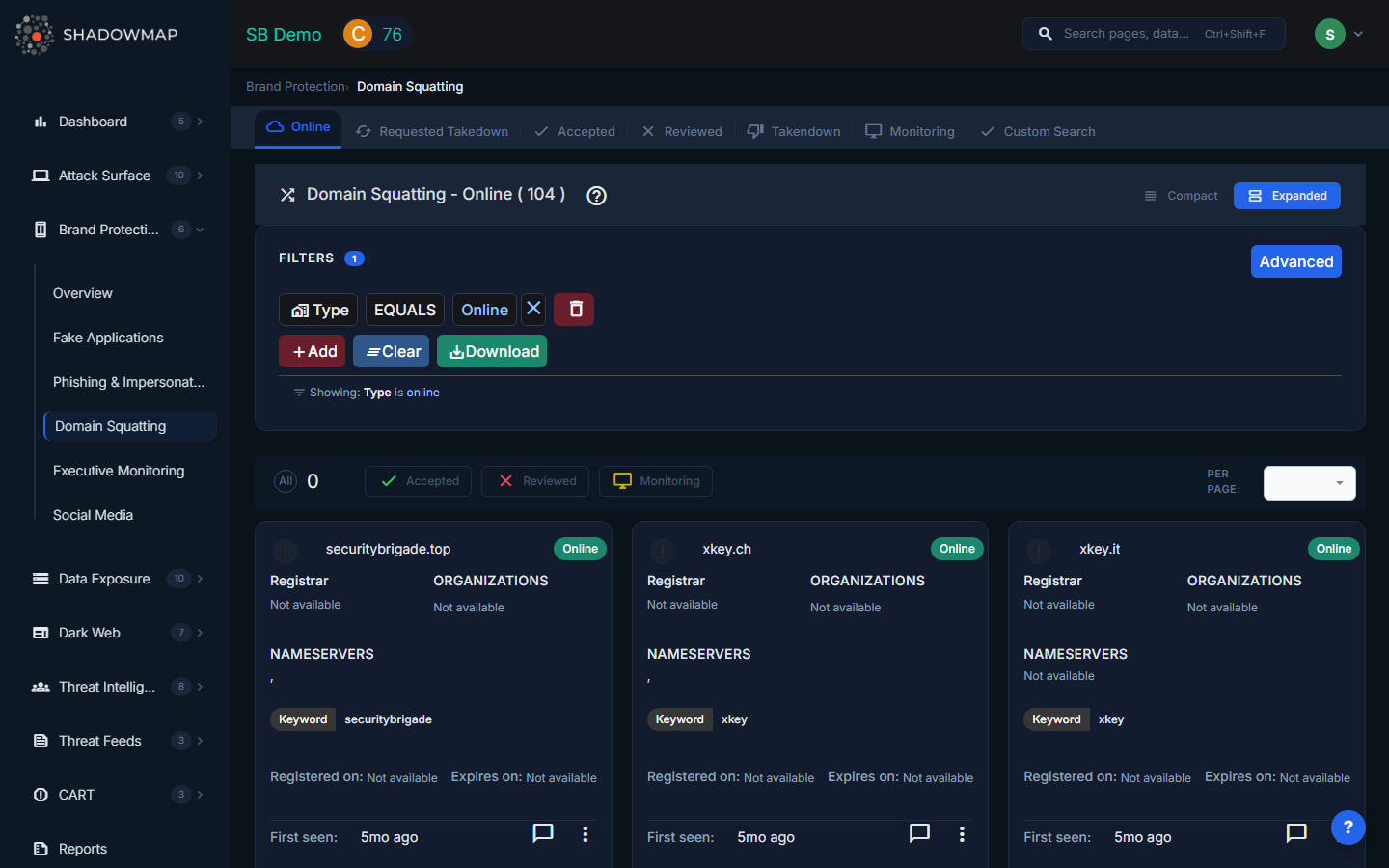
View Modes
The page supports two view modes via the toggle in the header:
- Card View (Expanded) -- Each domain displayed as a card showing favicon, domain name, live status, registrar, organizations, nameservers, keyword, registration dates, and first seen date. Best for investigative review.
- Compact View -- A condensed card layout for scanning large volumes quickly.
Data Per Domain
Each domain card displays the following information:
| Field | Description |
|---|---|
| Domain Name | The squatted domain (e.g., shad0wmap.com) |
| Favicon | The favicon served by the domain (or a default icon if none) |
| Is Live | Whether the domain currently resolves and serves content |
| Status | Current workflow status (see Status Tabs below) |
| Keyword | The brand keyword this domain was matched against |
| Registrar | The domain registrar where it was registered |
| Organizations | Organizations detected in WHOIS or certificate data |
| Nameservers | DNS nameservers assigned to the domain |
| Registered On | Domain registration date |
| Expires On | Domain expiration date |
| First Seen | When ShadowMap first detected this domain (relative time) |
DNS Records (Detail View)
Clicking into a domain opens its detail page, which includes a DNS Records table with:
| Column | Description |
|---|---|
| Type | DNS record type (A, AAAA, MX, CNAME, NS, TXT, etc.) |
| IP | The IP address or value of the record |
| Geolocation | Geographic location of the resolved IP |
| ASN ID | Autonomous System Number for network attribution |
| Reverse DNS ID | Reverse DNS lookup result |
The detail view also shows a Summary section with Targeted Domain, Is Live status, Status, URL Fuzzer type, Domain Registrar, registration/expiration dates, and Nameserver tags. A Technologies section lists detected web technologies.
Status Tabs
Findings are organized into workflow tabs:
| Tab | Description |
|---|---|
| Online | Domains that are currently live and resolving (default landing tab) |
| Requested Takedown | Domains for which a takedown has been requested |
| Accepted | Domains confirmed as genuine threats by your team |
| Reviewed | Domains investigated and marked as false positives or non-threats |
| Takendown | Domains that have been successfully taken down |
| Monitoring | Domains being actively watched -- registered but not yet weaponized |
| Custom Search | Search across all domains regardless of status |
Actions
Single-Item Actions (via three-dot menu)
- Mark as Online -- Move back to the Online tab for re-review
- Mark as Accepted -- Confirm as a genuine brand threat
- Request Takedown -- Initiate a takedown request to the registrar
- Mark as Reviewed -- Dismiss as a false positive after investigation
- Mark as Monitoring -- Place under passive monitoring
Bulk Actions (multi-select)
Select multiple domains using checkboxes and use the action bar:
- Online -- Bulk-move to Online status
- Accepted -- Bulk-confirm as threats
- Reviewed -- Bulk-dismiss as false positives
- Monitoring -- Bulk-place under monitoring
Additional Features
- Export -- Download findings in Excel format with applied filters
- Comments -- Add internal notes to any domain finding
- Per-page control -- Adjust results per page (25, 50, 100, 200)
- Search Filters -- Filter by keyword, status, registrar, nameserver, or other fields
Types of Domain Squatting
ShadowMap detects multiple squatting techniques:
| Type | Example | Description |
|---|---|---|
| Typosquatting | shadwmap.com | Common misspellings and keyboard-adjacent character substitutions |
| Homograph Attack | shad0wmap.com | Substituting visually similar characters (0 for o, l for 1, rn for m) including internationalized domain names (IDN homographs) |
| TLD Squatting | shadowmap.xyz | Your exact brand name registered on a different top-level domain (.xyz, .io, .net, .info, etc.) |
| Combosquatting | shadowmap-login.com | Your brand combined with common words (login, secure, verify, update, support, etc.) |
| Subdomain Abuse | shadowmap.malicious-host.com | Your brand name used as a subdomain on an attacker-controlled domain |
| Bitsquatting | shadowmaq.com | Single-bit errors that occur during DNS resolution |
The URL Fuzzer field in the detail view indicates which fuzzing technique originally identified the domain.
Recommended Workflow
- Start with the Online tab -- review live domains that need immediate attention
- Investigate each domain -- click through to see DNS records, technologies, and WHOIS data
- Prioritize domains with active content -- live domains hosting phishing pages are the highest priority
- Place emerging threats on Monitoring -- newly registered domains that are parked may become active later
- Request takedowns for confirmed malicious domains
- Mark false positives as Reviewed -- legitimate partner or subsidiary domains that match keywords
Use Cases
- Pre-emptive defense -- Detect and take down lookalike domains before they are used in phishing campaigns
- Domain portfolio protection -- Identify TLD squatting opportunities for defensive registration
- Threat intelligence -- Track registrar patterns and infrastructure used by attackers targeting your brand
- Compliance -- Maintain evidence of brand protection activity for regulatory or legal purposes
Related
- Phishing & Impersonations -- Squatted domains often host phishing content
- Brand Protection Overview
- Takedown Requests