
Leaked Files
ShadowMap detects sensitive files belonging to your organization that have been exposed on malware analysis platforms, public file-sharing services, and other public sources. This module identifies documents, database exports, configuration files, and other sensitive files that may contain proprietary or confidential data.
Overview
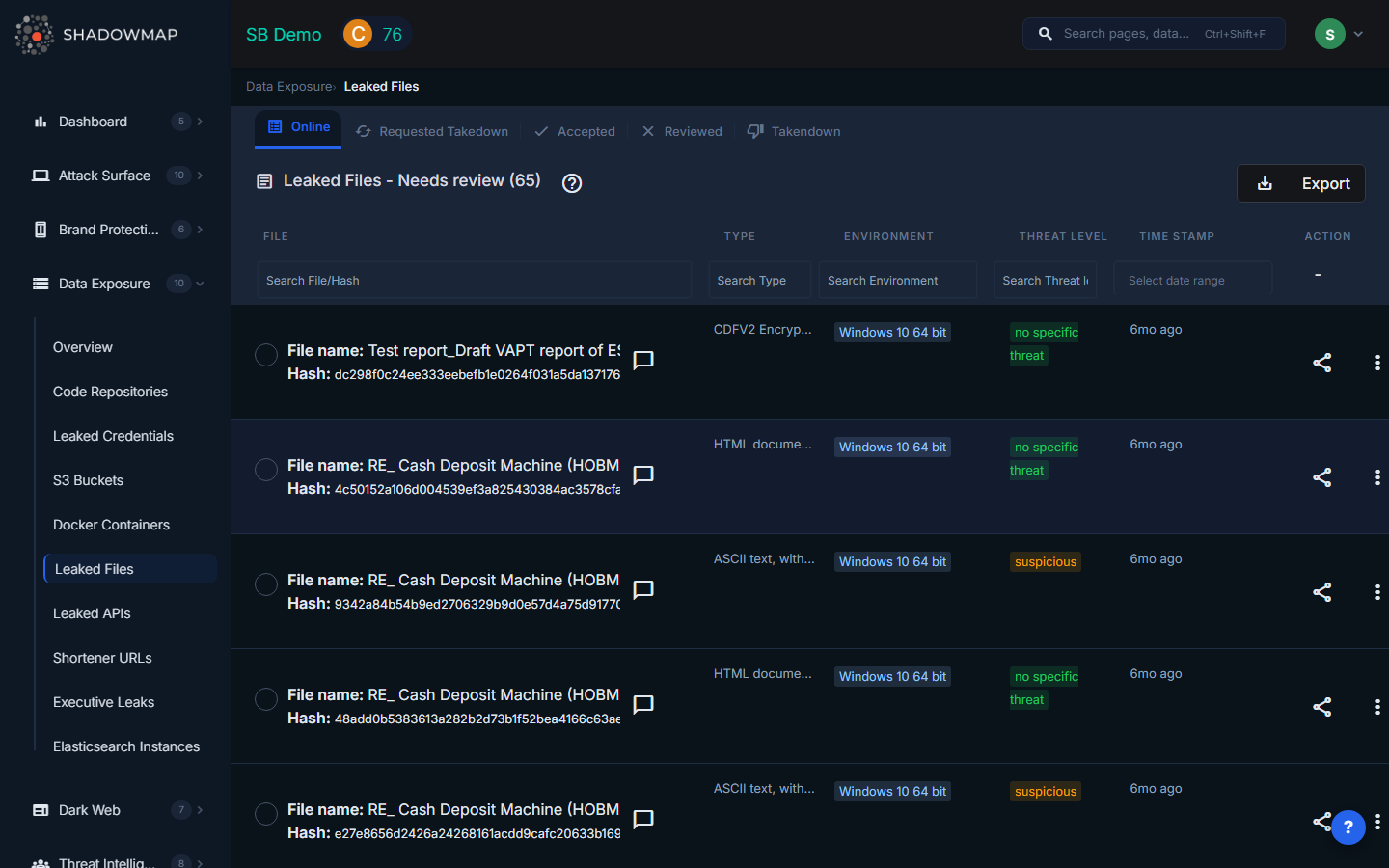
The listing page displays leaked files in a structured table with sortable columns. Results support bulk selection for batch operations, and a detail modal provides full metadata for each file. The view is organized by file status tabs (All/Needs Review, Accepted, Takedown Requested, Takedown Completed, Reviewed).
Understanding the Data
| Column | Description |
|---|---|
| File Name | Name of the leaked file. Clicking the row opens the file's source URL in a new tab. |
| Hash | The file's cryptographic hash (SHA-256 or MD5), used to uniquely identify the file across sources |
| Type | The file format/extension: CSV, JSON, XML, SQL, TXT, PEM/KEY, ENV, config, and others |
| Environment | The detected analysis environment where the file was processed (e.g., quickscan, full sandbox) |
| Threat Level | The malware analysis verdict for the file |
| Date | When the file was first detected, shown as relative time |
Detail View Modal
Clicking View Details on any file opens a modal showing the complete metadata:
- File name and Hash
- Summary of the file's contents
- Threat Level and Environment
- Type (file format)
- Sample link (direct URL to the file on its source platform)
- Timestamp of detection
File Types
ShadowMap categorizes leaked files by type. Common types include:
| Type | What It Typically Contains |
|---|---|
| CSV | Database exports, customer lists, financial data, employee records |
| JSON | API responses, configuration data, application state dumps |
| XML | Application configurations, data interchange files, SOAP responses |
| SQL | Database dumps, schema definitions, stored procedures with embedded credentials |
| TXT | Log files, credential lists, configuration notes |
| PEM/KEY | SSL/TLS certificates, private keys, SSH keys |
| ENV | Environment variable files containing API keys, database credentials, and service URLs |
| Config | Application configuration files (nginx.conf, apache.conf, php.ini, etc.) |
Threat Levels
The threat level reflects the malware analysis platform's verdict on the file:
| Threat Level | Badge Color | Meaning |
|---|---|---|
| Malicious | Red | The file was flagged as malicious -- it may contain malware or was submitted alongside malware |
| Suspicious | Yellow/Warning | The file exhibits suspicious characteristics but no definitive malware verdict |
| Ambiguous | Yellow/Warning | The analysis was inconclusive |
| No Specific Threat | Green | The file is not malicious, but it may still contain sensitive organizational data |
| No Verdict | Green | No malware analysis verdict is available |
| Not Available / Unknown | Gray | The file was not processed by the analysis platform |
Note: Even files with "No Specific Threat" require attention -- the concern is not malware but data exposure. A non-malicious CSV file containing customer records is still a critical finding.
Critical File Types That Affect Security Rating
Certain file types carry heavier Security Rating penalties due to the severity of what they typically expose:
- PEM/KEY files -- Private keys enable impersonation, man-in-the-middle attacks, and decryption of encrypted traffic
- ENV files -- Environment files typically contain complete credential sets for production systems
- SQL dumps -- Database exports may contain entire customer databases, including PII
- Config files -- Server configurations expose internal architecture, service endpoints, and sometimes embedded credentials
Available Actions
Individual Actions
| Action | Description |
|---|---|
| Mark as Reviewed | Move the finding to the Reviewed (false positive) list |
| Mark as Online | Restore a reviewed finding back to active status |
| Mark as Accepted | Acknowledge the finding without marking it as false positive |
| Remove from Accepted | Reverse the accepted status |
| Request Takedown | Submit a takedown request to remove the file from its source |
| View Details | Open the full detail modal |
| Comment | Add internal notes using free-text or templates |
| Share via Integration | Push to connected tools (ServiceNow, Jira, etc.) |
Bulk Actions
Select multiple files using checkboxes to:
- Bulk Mark as Reviewed -- Dismiss multiple false positives at once
- Bulk Mark as Online -- Restore multiple reviewed items
- Bulk Share via integrations
Filtering and Search
The dynamic filter panel supports:
- Filename -- Search by file name
- Type -- Filter by file format (CSV, JSON, SQL, etc.)
- Environment -- Filter by analysis environment
- Threat Level -- Filter by malware analysis verdict
- Timestamp -- Filter by detection date
Response Guidance
- Assess the contents. Before taking action, understand what data the file contains. A leaked ENV file with production database credentials is an emergency; a leaked public marketing PDF is not.
- Rotate all credentials found in leaked configuration files, ENV files, and SQL dumps. Assume anything in the file is compromised.
- Determine the source. How did this file end up on a malware analysis platform? Common paths include: an employee uploaded it for scanning, malware on an employee's device exfiltrated it, or a third-party vendor exposed it.
- Request takedown for files containing sensitive data. While the file may already have been downloaded by others, removing it from public platforms limits further exposure.
- Check for related files. If one file was leaked, others from the same source may also be exposed. Search for the same hash, similar file names, or the same upload timeframe.
- Review endpoint security. If the file reached a malware analysis platform through an infected endpoint, investigate the device for active malware infections.