
JS Trackers
ShadowMap identifies and catalogs third-party JavaScript trackers embedded in your organization's web applications, providing visibility into an often-overlooked area of your external attack surface.
Overview
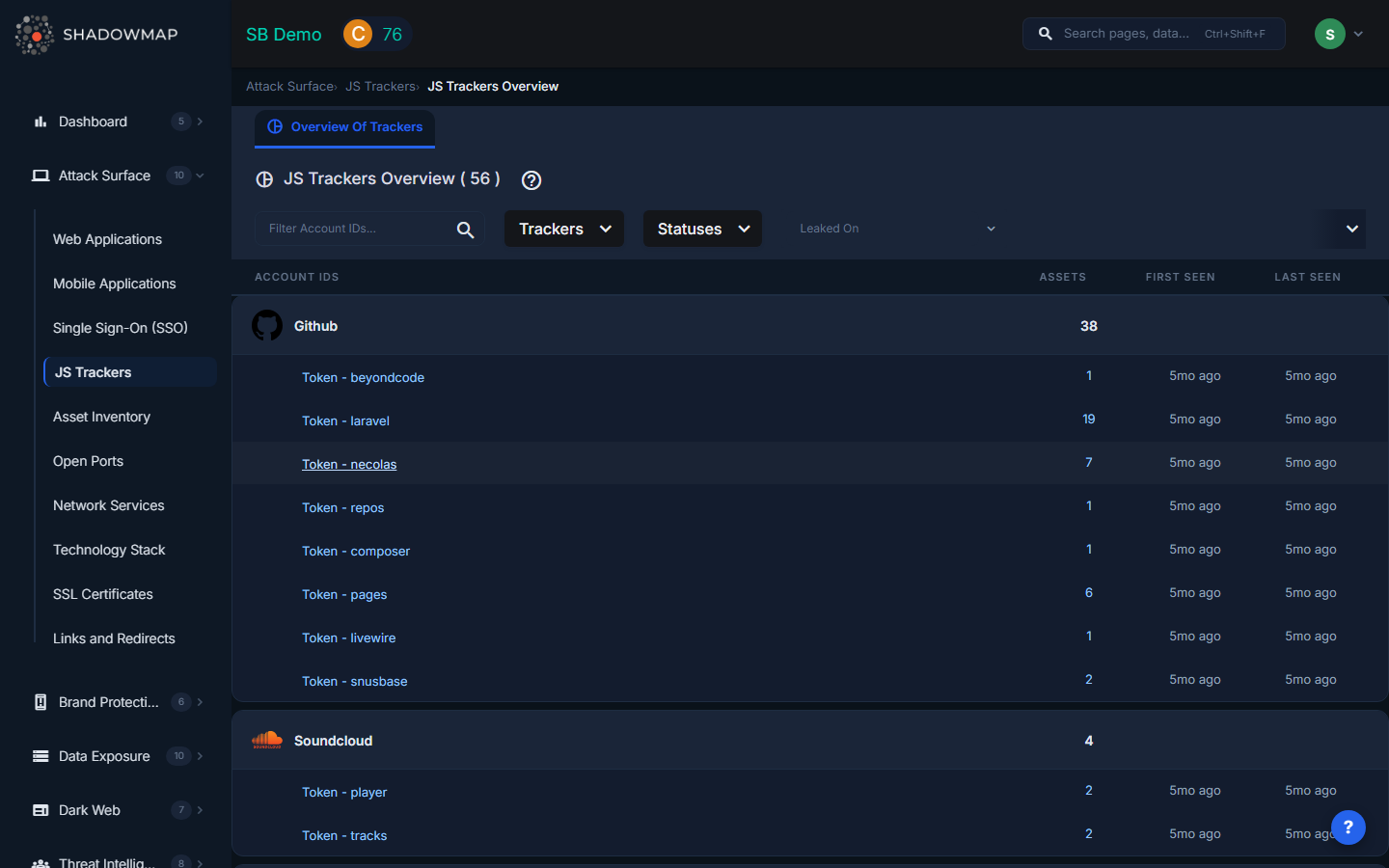
The JS Trackers view displays all detected third-party JavaScript providers in a grouped card layout. Each card represents a tracker provider (e.g., Google Analytics, Facebook Pixel, HubSpot), and expands to show individual account IDs associated with that provider along with the number of assets where each account ID was found.
Why Third-Party JavaScript Is a Risk
Every third-party script loaded on your web pages runs with the same privileges as your own code. This creates several categories of risk:
Data Exfiltration
Malicious or compromised tracker scripts can capture keystrokes, form inputs, session tokens, and personally identifiable information (PII). Magecart-style attacks have used compromised analytics scripts to skim credit card data from e-commerce sites. If a tracker provider is breached, every site loading their script is immediately at risk.
Compliance and Privacy
Regulations including GDPR, CCPA, LGPD, and PCI DSS require organizations to know what data is being collected and by whom. Undisclosed or unauthorized tracking scripts can result in regulatory fines and legal liability. Many organizations discover trackers on their sites that were added by marketing teams or third-party agencies without security review.
Supply Chain Attacks
Attackers increasingly target third-party JavaScript providers as a force multiplier. Compromising a single analytics or advertising provider can give access to thousands of downstream websites. Notable examples include the British Airways breach (2018) and the Ticketmaster breach (2018), both executed through compromised third-party scripts.
Performance and Availability
Excessive or poorly optimized tracking scripts degrade page load times, negatively impacting user experience and SEO rankings. If a tracker provider experiences an outage, synchronously loaded scripts can block your page from rendering entirely.
Understanding the Data
The view is organized as a grouped list with the following structure:
Provider Level (Group Header)
| Field | Description |
|---|---|
| Provider Icon | Favicon of the tracker provider, loaded from their domain. |
| Provider Name | The tracker service name (e.g., Google Analytics, Hotjar, Intercom). Clicking the provider header opens the Web Applications view filtered to show all applications using that tracker. |
| Assets | Total count of web applications where this tracker provider was detected. |
Account ID Level (Child Rows)
| Field | Description |
|---|---|
| Account ID | The specific account identifier found in the tracker's embed code (e.g., a Google Analytics property ID like UA-XXXXXX-X, or a Facebook Pixel ID). Clicking an account ID opens Web Applications filtered to that specific account. |
| Assets | Number of web applications using this specific account ID. |
| First Seen | When ShadowMap first detected this account ID on your assets, displayed as relative time. |
| Last Seen | When ShadowMap most recently observed this account ID, displayed as relative time. |
Filters
The filter bar supports:
- Search -- Free-text filter across account IDs.
- Trackers -- Multi-select filter to show specific tracker providers.
- Statuses -- Filter by the status of the associated web applications.
- Date Range -- Filter by when trackers were last seen, useful for identifying recently added or removed trackers.
Key Investigations
Common use cases for the JS Trackers view:
| Investigation | How |
|---|---|
| Unknown tracker audit | Review the full list of tracker providers. Any provider your security team does not recognize warrants investigation. |
| Account ownership verification | Check that all account IDs belong to your organization. An unknown Google Analytics ID may indicate a third party is collecting your users' data. |
| Shadow marketing detection | Marketing agencies sometimes add their own tracking codes without disclosure. Look for account IDs that do not match your organization's known accounts. |
| Post-incident scope assessment | If a tracker provider reports a breach, quickly identify which of your applications load their script and how many users may be affected. |
| Regulatory compliance | Export the tracker inventory to document all third-party data collection for GDPR Article 30 records of processing or CCPA disclosure requirements. |
Drill-Down to Web Applications
Both the provider header and individual account ID rows are clickable. Clicking either opens the Web Applications view with pre-applied filters showing only applications that include that tracker or account ID. This lets you quickly assess the scope of any tracker's presence across your infrastructure.
Related
- Web Applications -- View the applications where trackers are embedded
- Links & Redirects -- Other third-party dependencies on your web properties
- Attack Surface Overview -- How ShadowMap discovers and monitors your external assets